MagicLight AI review,
and the alternative for channels.
What MagicLight AI does, what it costs and what its users say, then where Framesail fits. MagicLight starts you from a story template and a style menu. When you run a channel, the look has to be yours, and it has to stay yours. Framesail is the MagicLight AI alternative for people who run channels: a look learned from your own videos, held across every shot of a long-form video and every episode after it.
What is MagicLight AI?
MagicLight AI is an AI video generator for long-form story videos. You bring an idea, a script or a story, pick a story template and a style — 3D cartoon, picture book, comic, realistic and more — and it returns a finished video up to 50 minutes long. It runs on third-party video models including Seedance, Kling, Veo 3 and Sora 2.
MagicLight AI review: where it's strong
- Story templates for kids stories, faith messages, lessons, explainers and comedy give you a working structure to fill in.
- Videos up to 50 minutes long, with characters it says keep their look and personality across the whole video.
- A wide set of tools in one place: story, script and image to video, avatars, voice cloning, lip sync and subtitles.
MagicLight AI pricing
MagicLight AI runs on credits. As of October 23, 2026, its pricing page lists a free plan with limited credits and no card required, and five paid plans, Standard, Plus, Pro, Ultra and Ultimate, from $7.50 to $75 a month billed yearly, shown as a limited-time 50% off. They include 8,000 to 280,000 credits a month, and every paid plan lists 1080p export with no watermark and a general commercial license.
Where a channel outgrows it
Its templates and the reviews on its homepage lean toward kids, family and faith stories, and the look comes from a style menu every other user picks from too. A YouTube channel needs the opposite: a look that belongs to the channel, and the same cast in episode forty as in episode one. That is the job Framesail is built for.
MagicLight AI reviews
What MagicLight AI users say
On Trustpilot, MagicLight AI scores 1.8 out of 5 from 103 reviews, as of October 23, 2026, and 78% of those reviews are one star. The same complaints come up again and again: credits running out fast, unexpected or confusing charges, characters and voices that change between scenes, output that misses the script, and support or refund emails that go unanswered. The positive reviews are fewer but real: people praise how quickly a story becomes a video and how good it looks, and a few thank its support team. MagicLight has replied to 35% of its negative reviews there.
“I made a 4-second video and it cost me around 1,300 credits.”
“The character's voice changed between scenes, some scenes had no narration at all”
How Framesail handles the same problems
Credits run out faster than expected
Several reviewers say a few seconds of video used far more credits than their plan suggested.
Framesail shows what each step costs in credits before you generate, next to your balance. A job you can't afford is stopped before it runs, so you're never charged for it.
Characters and voices change between scenes
Reviewers describe a character's voice changing mid-video and the same character showing up twice in one frame.
You approve one reference image for each character, place and object, and every scene is drawn to match it. Each speaking character keeps the voice you picked for it, line after line.
Output that misses the script
Others say finished videos skipped parts of their script or came out unusable, and fixing them cost more credits.
Every step stays editable: the script, each reference, each voice line and each scene. When one scene comes out wrong, you redo that scene, not the whole video.
What you get switching to Framesail
Cinematic range, channel controls.
Your style, not one fixed look
MagicLight gives you a menu of styles to pick from. Framesail locks whatever cinematic look you define — palette, lensing, mood — and holds it across every shot. The style is yours, not the tool's.
A look you can reuse
Lock a look once and every future episode honors it. That reuse is what makes a channel look like a brand.
Controls for running a channel
The same characters and settings in every video, scene-level script control, a clean video export that opens in any editor, and a full commercial license. Built for someone running channels, not making a one-off story.
MagicLight vs. Framesail
An honest side-by-side.
Same job, different lanes. MagicLight starts from story templates and a style menu. This is for channels that need a look of their own and real controls — storybook included, when you want it.
| Dimension | MagicLight | Framesail |
|---|---|---|
| Best at | Template-led story videos: kids, faith, lessons, explainers | Cinematic long-form, faceless channels |
| Where the look comes from | Picked from its style menu | Learned from your own published videos and reused every episode |
| Continuity | Consistent characters within a video | The same characters and settings in every video on the channel |
| Built for | Story creation from templates | People running real YouTube channels |
What changes when you switch
You stop picking a look. You start defining one.
In practice, instead of choosing from preset styles, you lock your own references at step two, and everything downstream — storyboard, animation, final video — uses them. Each step is editable before the next runs.
- Step 01
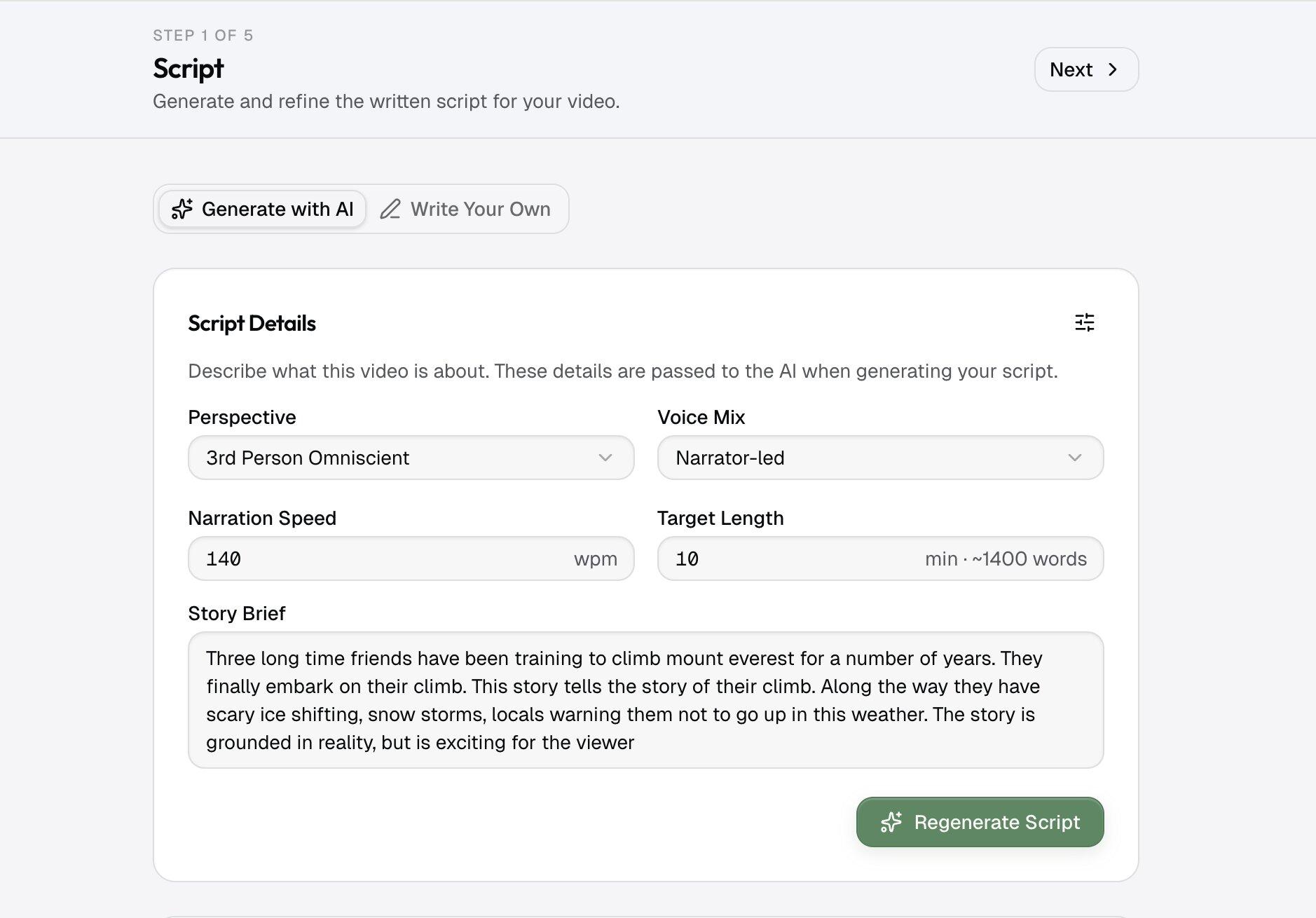
Script
No template to pick first — start from a one-line brief, or drop in a script you've already written. The script agent reads it and tags who and where each scene needs, so every later step knows the cast.
- Step 02
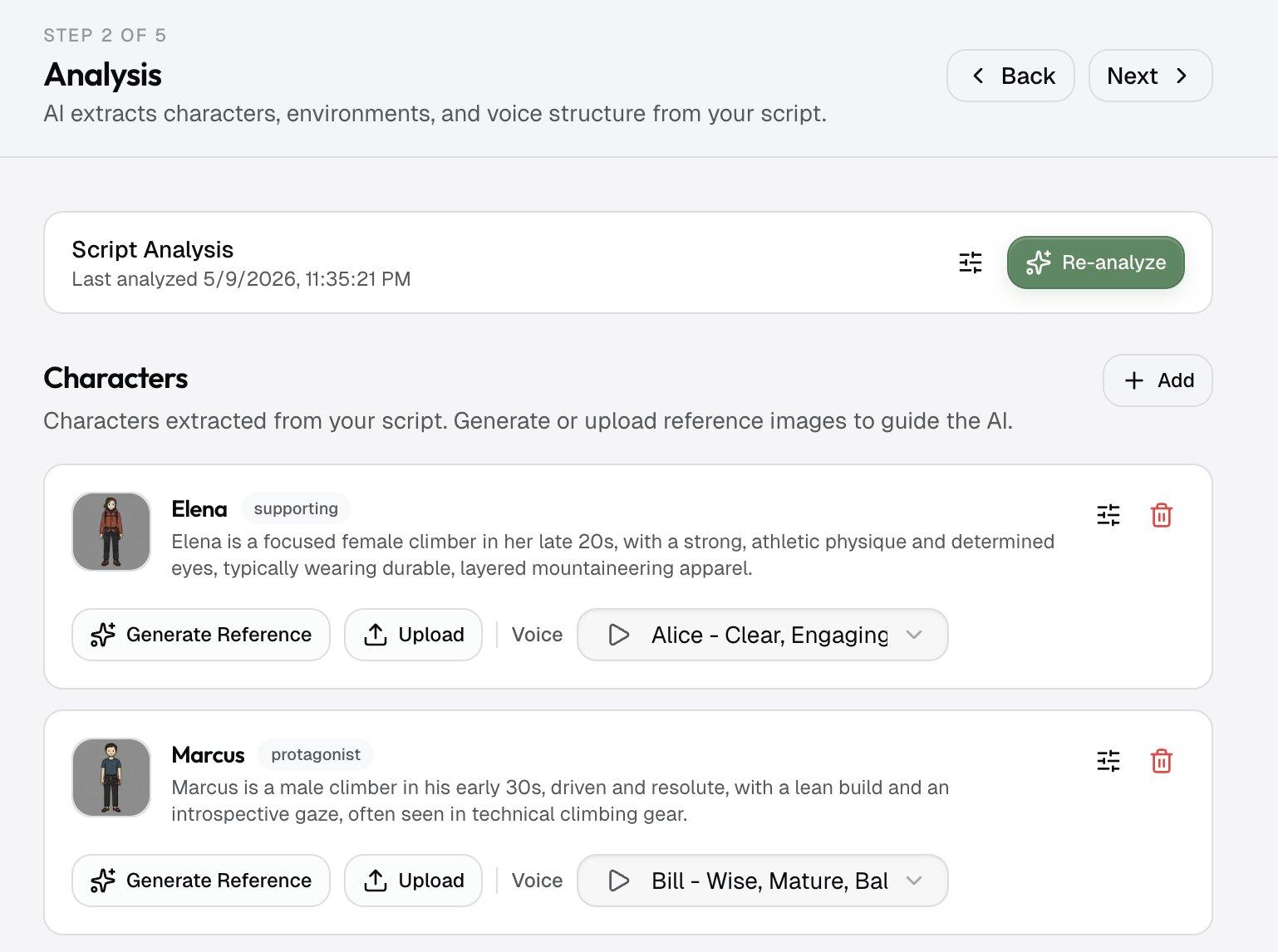
Your cast and settings
Each character and environment gets a reference image you approve once, alongside the art style you've defined. From there every render holds to them.
- Step 03
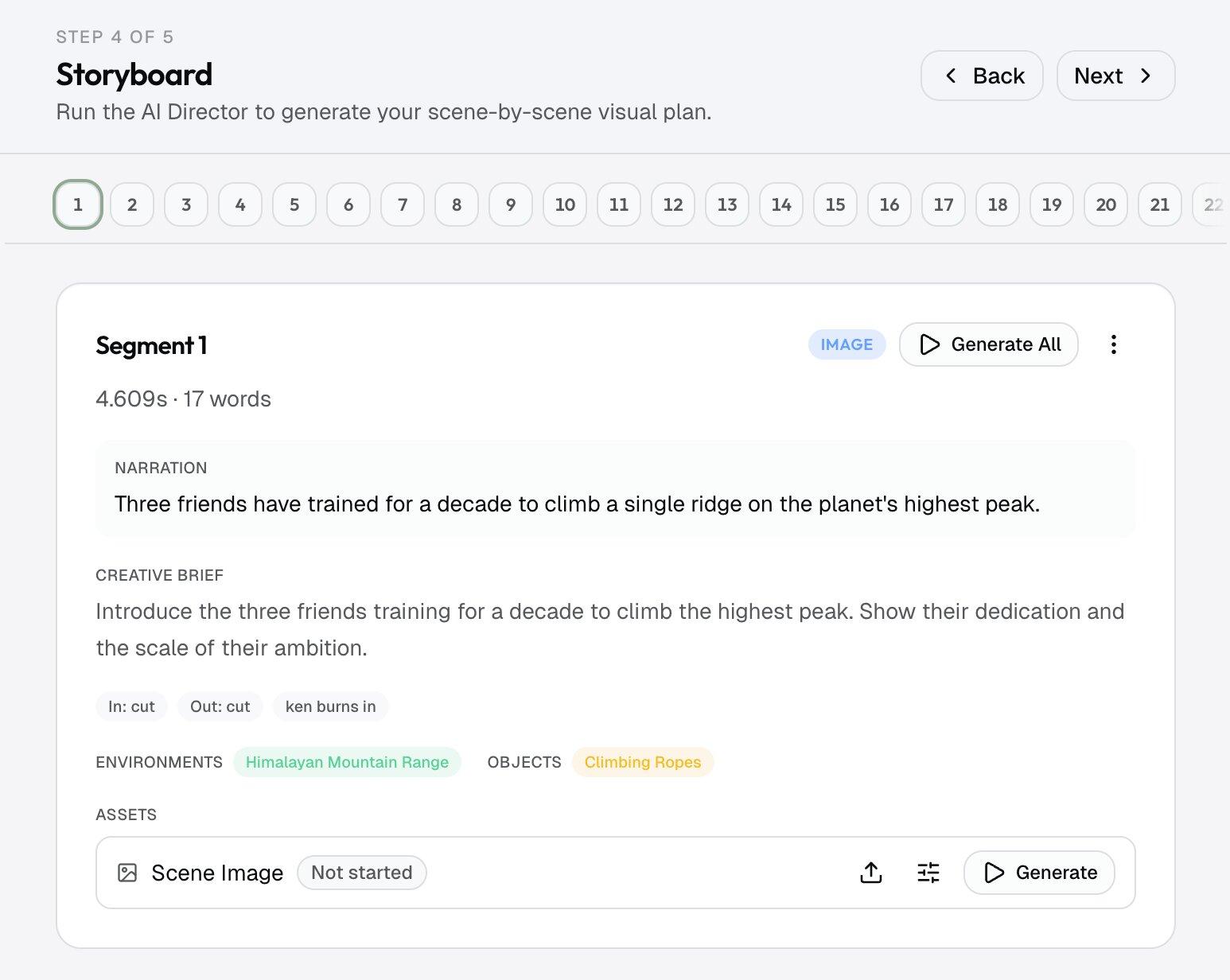
Storyboard + voice
Each shot becomes a storyboard frame built on those approved references, and a narrator voice you choose reads the script — documentary, dramatic, or deep. The voice is your call, not the tool's.
- Step 04
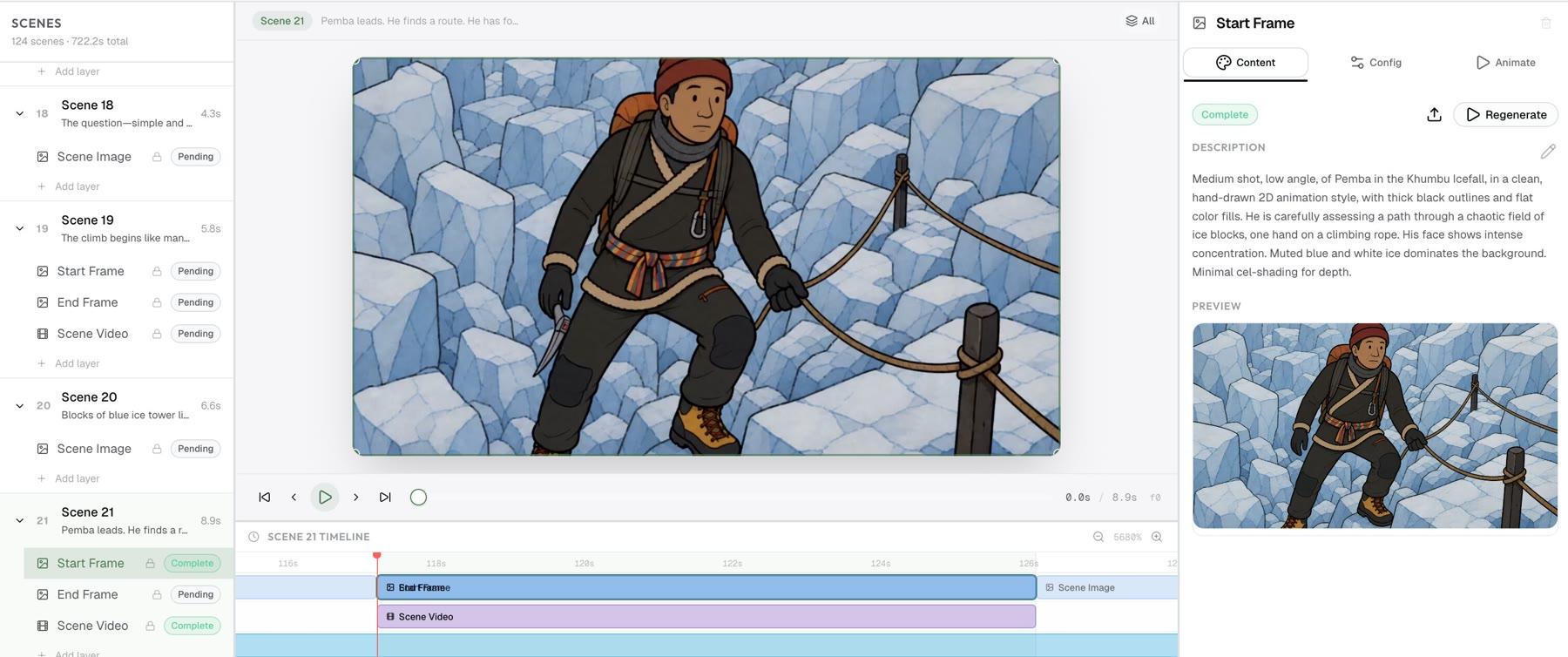
Final video
Frames turn into moving scenes; you layer in titles, captions, and lower thirds, then export. Upload the video straight to YouTube, or drop it into DaVinci or Premiere — nothing's trapped inside the app.
A shared style menu is not a brand
Why creators look for a MagicLight AI alternative.
MagicLight is a template-led story video generator: pick a story template and a style from its menu, and it builds the video. The limit shows up when you run a channel: the look comes from a menu every other user picks from too, not from your channel.
Framesail was built for that job. You define your own cinematic style once — palette, lensing, mood — and it becomes a look learned from your own videos every episode honors. It's the same tool behind our long-form video generator and character consistency lock.
Questions
MagicLight vs. Framesail.
What is MagicLight AI?
MagicLight AI is an AI video generator for long-form story videos. It turns an idea, script or story into a finished video up to 50 minutes long, starting from story templates for kids stories, faith messages, lessons, explainers and comedy, in a style picked from its menu.
Is MagicLight AI legit?
Yes. MagicLight AI is a real product: a web app at magiclight.ai with Android and iOS apps, and paid plans that include a commercial license. Its user reviews are mostly negative, though. As of October 23, 2026 it scores 1.8 out of 5 on Trustpilot from 103 reviews, and the most common complaints are about how fast credits run out, unexpected charges and unanswered support emails.
Is MagicLight AI free?
It has a free plan with limited credits and no card required. 1080p export with no watermark and a general commercial license are listed on the paid plans.
How much does MagicLight AI cost?
As of October 23, 2026, MagicLight's pricing page lists five paid plans, Standard, Plus, Pro, Ultra and Ultimate, from $7.50 to $75 a month billed yearly ($90 to $900 a year), shown as a limited-time 50% off. They include 8,000 to 280,000 credits a month. Check magiclight.ai/pricing for current prices.
Is MagicLight AI worth it?
For a quick story video from a template, some users find it fast and good-looking. Read the recent reviews before paying for a year: the most common complaint is how quickly credits run out. If you run a YouTube channel and need the same characters, voices and look in every episode, Framesail is built for that job.
What is a good MagicLight AI alternative?
If you run a channel, Framesail. MagicLight starts from its templates and style menu. Framesail is for channels that need cinematic range, a look learned from your own videos, and the same characters across every episode: define any look once — storybook included — and every episode uses it.
What's the difference between MagicLight and Framesail?
MagicLight is built around story templates and a menu of styles. Framesail is built for cinematic long-form faceless YouTube channels: a look learned from your own videos, the same characters and settings across every video, and a clean export with a commercial license.
Is there a free MagicLight alternative?
Not a free one. Framesail is a paid product. Plans and credits are on the pricing page.
Can I match a specific visual style instead of a preset one?
Yes. That's the core difference. Your own palette, lensing, and mood become a look learned from your own videos, and every shot and every future episode uses it. See the style analysis page for how the lock works.
How do credits compare?
Transparently: the model picker shows each model's credit cost before you generate — so credits go to footage you keep, not surprise burn. Credits come with your plan — see the pricing page for what each tier includes.
Can I use the output commercially?
Every paid tier carries a full commercial license — monetized channels, client work, and ads are all covered.
More on the main FAQ page.
Lock your look. Ship the channel.
The fairest comparison is a render of your own — no watermark, clean export, yours to keep.
Framesail is an independent product and is not affiliated with, endorsed by, or sponsored by MagicLight. MagicLight is a trademark of its respective owner. MagicLight features and prices reflect magiclight.ai as of October 23, 2026; ratings and quotes reflect Trustpilot on the same date.