Script to video AI: paste the script, get the finished video.
A finished script and no way to produce it is where most channels stall. Paste it in. Framesail voices it, plans a shot for every line, animates them with the same characters and the same look throughout, and hands you the finished video.
What happens to your script.
Every step below runs on its own and shows you the result before the next one starts. Change anything you don't like, or let the whole thing run and review the finished video.
From script to finished video
Each step builds on the last.
- Step 01Create a video
Start with a brief, not a blank timeline.
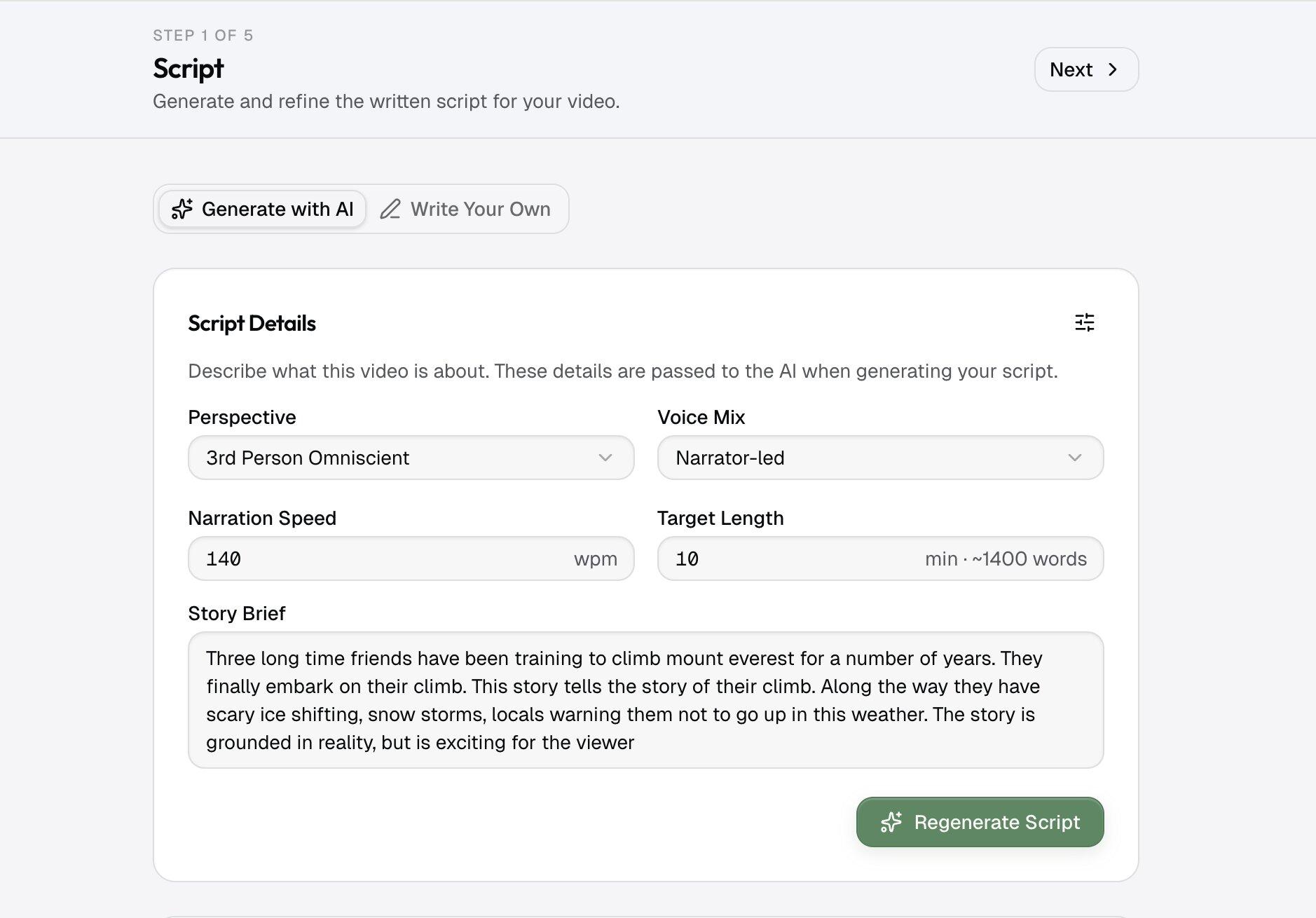
Tell it what the video is about, how long it should run, and the tone you want: documentary, dramatic, deep narrator. That one line is the whole input.
- Step 02Generate or paste
Generate a script, or bring your own.
Get a scene-by-scene script written to hold a viewer, or paste one you already have and it's followed line for line. Edit it before anything is made.
- Step 03Your cast and settings
Meet your cast and your settings.
Every character and place the script names is created once, in your style, and you approve each one. From here on, every shot uses the same faces and the same places. It's why shot fifty still looks like shot one.
Learn about style analysis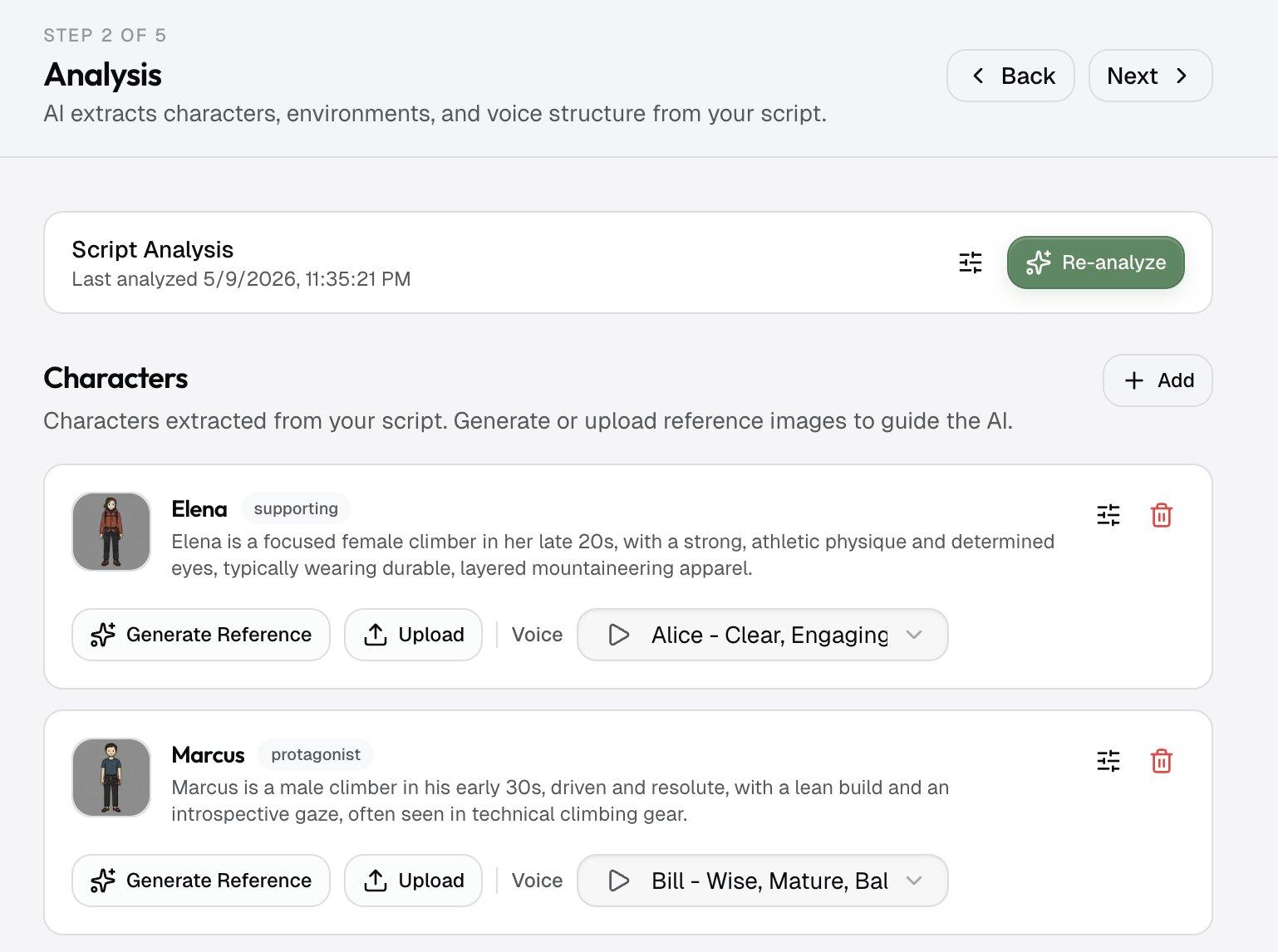
- Step 04Lay the timeline
The voiceover sets the pace.
Pick a narrator that sounds like a real channel, documentary, dramatic, or deep, not the flat text-to-speech you've heard a thousand times. The voiceover is recorded first, and every shot is timed to it.
- Step 05Fill the frames
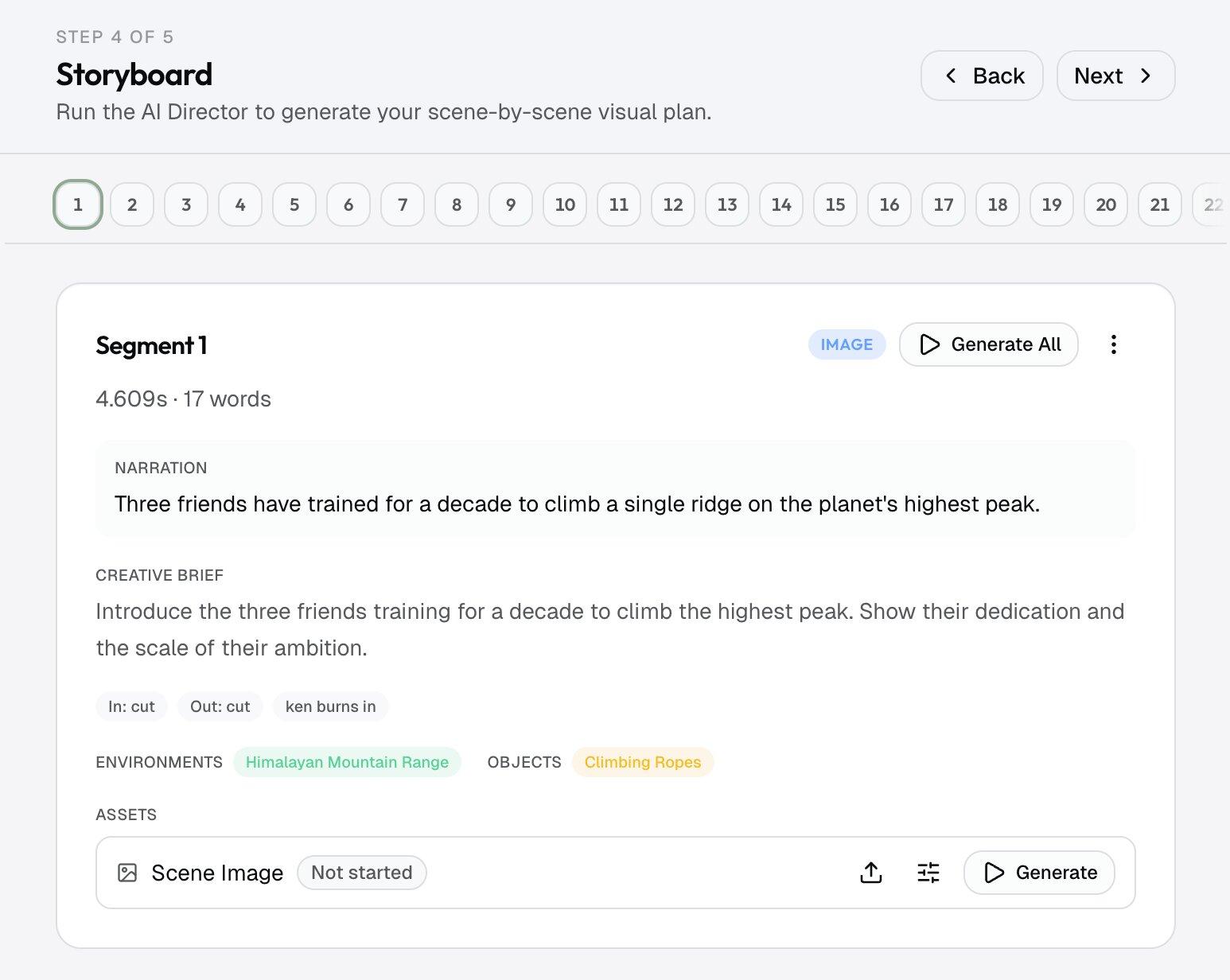
See the whole video as a storyboard.
One frame per shot, with your cast in it, timed to the narration. This is where the script becomes something you can watch, and the point to change a shot before it's animated.
- Step 06Animation & final video
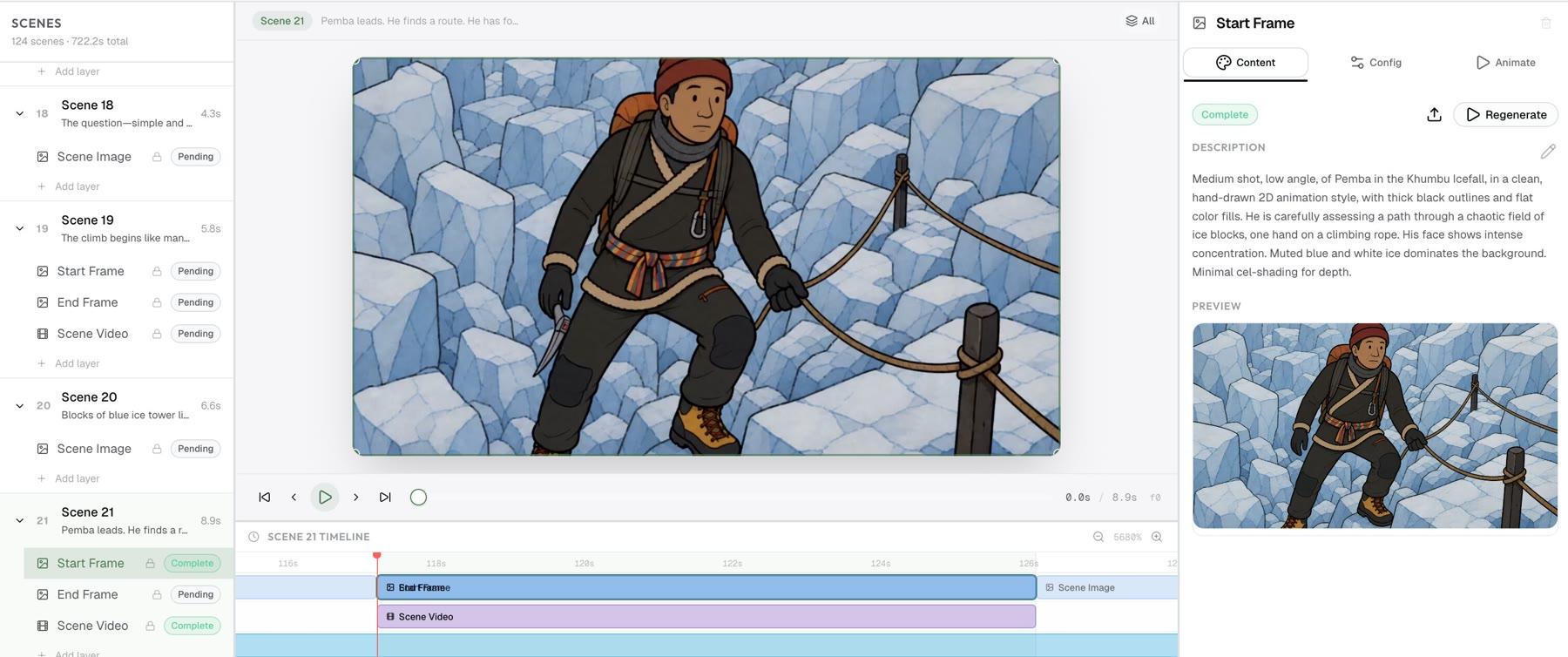
Animate the frames, then ship the video.
Each frame becomes a moving shot. Add title cards, lower thirds, and captions where you want them, then export a finished video ready for upload, or for a final pass in Premiere or DaVinci.
Why script-first
Every shot comes from your script.
Most tools treat the script as a transcript for the voiceover and let the visuals stop matching it. Here, every shot comes from the same script and the same cast, which is why our long-form AI video generator holds together at length, and what powers the faceless video generator use case for cinematic channels.
What you get
Built for writers and channels that publish.
Every line gets its shot
The script doesn't just become a voiceover. Each line gets a shot planned for it, timed to the narration, so the picture is always showing what the words are saying.
The same characters in every scene
Name a character in the script once. Every scene they appear in shows the same face, the same clothes, the same style. No surprise changes, no flicker from the first shot to the last.
Cinematic narrator voices
Pick from documentary, dramatic, and deep-narrator voice families tuned for long-form retention. Your script reads the way a real channel sounds.
A finish that doesn't read as AI
Every video exports in full HD — 1920×1080, or 1080×1920 for vertical — with motion that holds steady across every frame. A cinematic finish, not the flickery clips a viewer clocks at a glance.
One look, start to finish
Set the look once and it holds across the whole video. Lighting, palette, and character design stay stable scene to scene, so a fifty-shot piece feels like one production rather than a stitched-together reel.
Edit any prompt, swap any model
The defaults are tuned for narrative long-form. When a video calls for something different, change the prompt on any shot or swap the model.
Who it's for
Built for faceless and long-form YouTube channels.
This isn't a tool for theatrical films. It's script to video for the channels that live on retention: long-form pieces where a consistent cast, one look, and a cinematic finish are the difference between a watch and a skip. Documentary channels get real footage and real photos placed for them, and every video can be reviewed as a storyboard before it's animated.
Faceless narration channels
History, mystery, true-crime, and explainer channels run on a strong script and a steady narrator. Paste the script, pick a narrator voice, and every scene comes back in one consistent look. No camera, no on-screen host.
Documentary and educational long-form
Ten- and twenty-minute deep dives come back as one coherent video instead of a wall of stock footage. Recurring characters and settings stay the same across the whole runtime, which is what holds retention past the first minute.
Story and lore channels
Turn a written story into a finished film for your channel with a recurring cast that actually looks the same in every episode. Character consistency across shots — and across uploads — is what makes a serialized story channel feel like a real production.
Repurposing scripts you already have
If you write scripts faster than you can produce them, this is script to screen without the shoot. Bring the backlog, generate the video, and publish on schedule instead of leaving finished scripts sitting in a doc.
What makes it different
Not another clip generator.
Most script-to-video tools generate each shot in isolation. The character in shot seven isn't quite the character from shot two — the jaw is wider, the jacket lost a button, the colors changed. On a thirty-second clip you might not notice. Across a long-form video, that change is the tell that reads as AI and loses the viewer.
The fix is deciding the cast and the world before anything is made. Every character and setting your script names is created once, and every shot uses that same version. That's what gives you a look that holds from the first shot to the last, not just within a single clip.
The defaults are set for long-form storytelling, so you get a cinematic, studio-quality result without tuning anything yourself. When a video needs something else, change the prompt on any shot or swap the model. The result is a finished, professional video you can publish as-is or take into a longer edit — not a pile of clips you still have to assemble by hand.
Questions
Questions about script to video AI.
How does the script to video AI actually work?
You paste a script, or give it a one-line brief and let it write one. Framesail picks out every character and setting the script names and creates them once. It records the voiceover in the voice you choose, plans one shot per line timed to that voiceover, renders each shot as a still or an animated clip using the same characters and settings, and assembles the finished video. You can edit the result at any step before the next one runs.
Do I need to write the script myself?
Either works. Bring your own script and Framesail follows it line for line. Or give it a one-line brief and a target length, and it drafts a scene-by-scene script you can edit before anything is made.
What length of script does it support?
Built for long-form. Videos are built scene by scene, so the length scales with your script and credits rather than hitting a model's clip limit. Short pieces work too; they just use fewer credits.
Will characters stay consistent across shots?
Yes. Every character and setting is created once, before any shot is made, and every shot uses them. The same character looks like the same person from the first shot to the last.
Can I export to Premiere or DaVinci?
Yes. The finished video opens in any standard editor. Take it into DaVinci or Premiere, or upload it as-is. Nothing is tied to Framesail.
What does it cost to try?
Plans are on the pricing page — Creator, Pro, Studio, and Scale tiers, billed monthly or quarterly.
Can it generate studio-quality video from a script?
Yes. The finished video exports in full HD (1920×1080, or 1080×1920 for vertical), so it holds up on a big screen instead of reading as low-res AI. The defaults are tuned for a cinematic finish, with clean framing and a stable look, rather than the slideshow most script-to-video tools ship.
How does it keep characters consistent from shot to shot?
Every character and setting the script names is created once, before any shot is made, and every scene that features them uses that same version. That's what stops the changes and flicker you get when each shot is generated on its own. Shot fifty looks like shot one because it was made from the same characters.
Can I generate a full long-form video from one script?
Yes, long-form is what it's built for. The video is built scene by scene from your script, so length scales with the script and your credits instead of hitting a single model's short clip limit. A ten- or twenty-minute narration comes back as one coherent piece, cut to the voiceover.
Does it turn a script into video with voiceover, or just visuals?
Both. You pick a voice, Framesail records the voiceover from your script first, then times every shot to it. What you export is a finished video with voice, not a silent render you still have to score.
Do I need a paid plan?
Yes. Framesail is a paid product. The interactive demo on the home page walks through a real video without signing up, and plans are on the pricing page.
More on the main FAQ page. Coming from another script-to-video tool? See Framesail as a Pictory alternative or an InVideo alternative, or read our MagicLight AI review.
Bring a script.
Leave with a video.
Bring a script. Leave with a video.
Paste the script you already have and leave with a finished video.