AI stop motion with the handmade look, without the three-week shoot.
Real stop motion means puppets, a rig, a light tent, and weeks of reshoots. Framesail gives your channel the same stepped, handmade feel from a script: write it, pick the look, and get the finished video.
What it is
Built frame by frame, not a filter.
What it is
A sequence of stills, each one a small move from the last, cut at a low frame rate. The stepped, handmade cadence — and the tiny inconsistencies between frames — are the whole aesthetic.
What it isn't
Asking a video model for “stop-motion style.” Video models interpolate — they smooth in the exact motion stop motion leaves out. So Framesail builds the sequence from discrete stills, the way an animator would.
Straight from Framesail
Every frame is a generated still.
That clip up top? These are the fifteen frames behind it — each one generated from the frame before, the shelf clutter and warm key light held steady while only the robot moves. Play them at 2fps and the stills become motion.
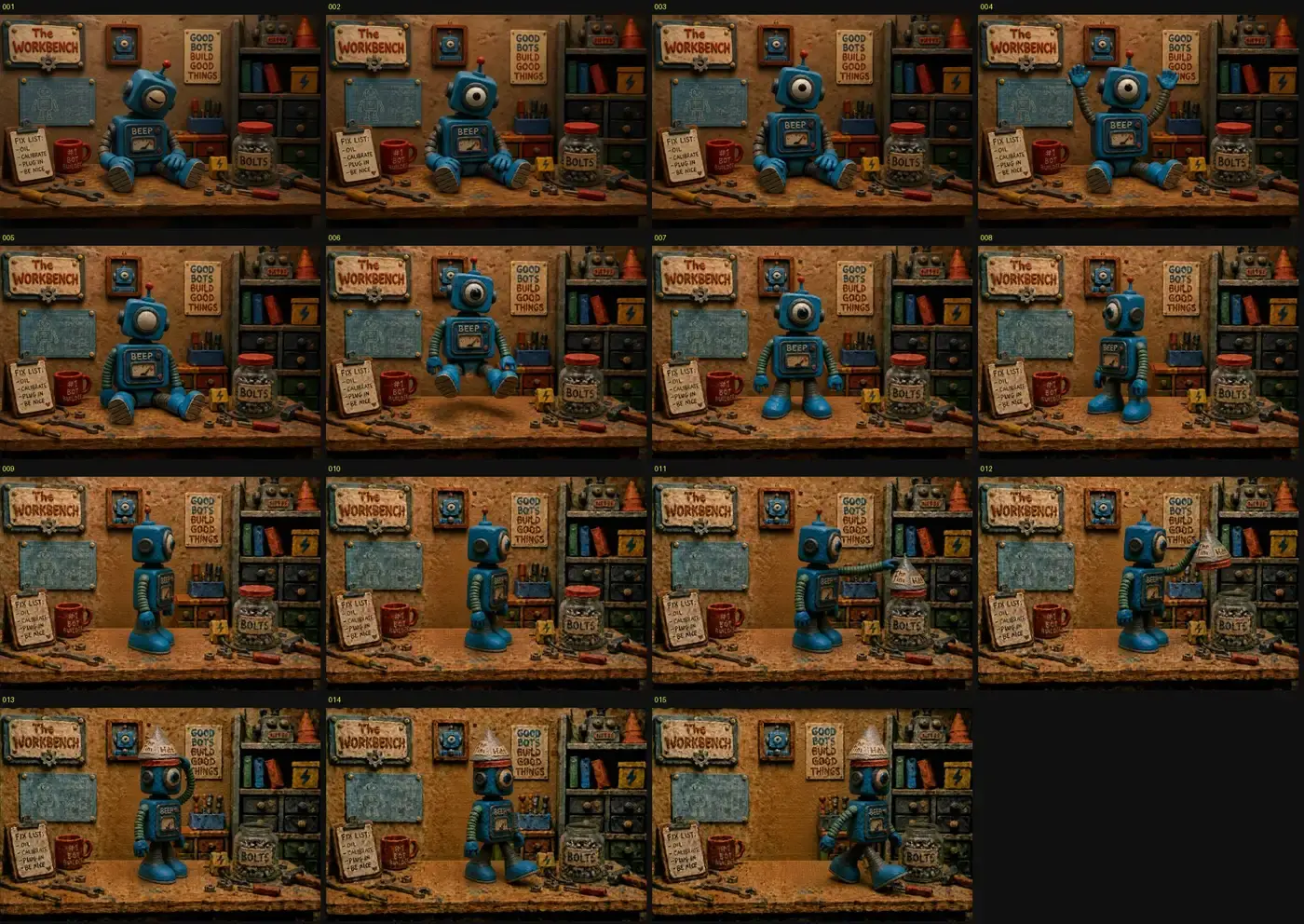
Every frame a still,
played back by hand.
How the technique works
Four rules make it read as stop motion.
The storyboard authors all of this for you — the anchor, the frame chain, the one-move-per-frame deltas. The full write-up shows the prompts.
- 01
Anchor frame
One locked-off establishing shot sets the puppet, the set, and the light. Every later frame is judged against it.
- 02
Chain every frame
Each frame generates from the previous frame — not the anchor. That's what keeps the set dressing and light from changing between frames.
- 03
Move one thing
One pose element changes per frame — an eye opens, an arm lifts an inch. Small deltas read as animation; big ones read as a cut.
- 04
Hold the camera
The camera never moves. Identical framing frame-to-frame is what sells the handmade, tabletop feel at 2fps.
Same rules, different build
Works for any handmade look.
A tin robot at a lamplit drafting desk — new set, same discipline. The desk clutter, the blueprints, and the warm key light hold across every frame while only the puppet moves. Claymation, paper cutout, felt, or brickfilm all run the same way.
And handmade is one shelf of a bigger catalog — curated presets, or a look pulled from any reference video by style analysis and made your own. The whole range is on the styles page.
Questions
Questions about AI stop motion.
What is AI stop motion animation?
AI stop motion animation is the classic technique — a sequence of still frames where the subject moves slightly between each one — produced with an image model instead of a physical set. You generate an anchor frame, then generate each next frame from the previous one with a small pose change, and play the stills back at a low frame rate. The output has the stepped, handmade feel of clay or puppet animation without a rig, a light tent, or weeks of reshoots.
How does Framesail keep the set the same between frames?
Every frame is made from the previous frame, and the character and setting are created once in the project. The storyboard explicitly chains each shot from the one before it, so the model is never asked to reimagine the scene — only to move one thing in it.
Why not just ask a video model for stop motion?
Video models interpolate — they produce smooth motion, which is exactly what stop motion isn't. The stepped, 2-frames-per-second cadence and the tiny inconsistencies between stills are the aesthetic. Generating discrete frames and cutting between them is truer to the craft, and it gives you control over every single pose.
Can I do this with my own characters and style?
Yes. Define your character and set once and every frame uses them. The clay-and-felt look in the demos is just one style — claymation, paper cutout, felt puppets, LEGO-style brickfilm, or any handcrafted look you can describe or show works the same way.
How long does a stop motion sequence take?
Each frame is one image generation, chained from the previous frame and rendered in the background. The storyboard, narration timing, and frame chaining are authored for you; you edit the result rather than building it by hand.
More on the main FAQ page.
Animate something by hand. Sort of.
Script to final video, ready to publish on your channel.