How to make stop motion animation with AI, frame by frame
Stop motion animation with AI: anchor one frame, chain each frame from the last, move one thing at a time. The full technique, real prompts included.
By Jordan · Cofounder, Framesail
Ask a video model for stop motion animation and you get the one thing stop motion doesn't have: smooth motion. The clay looks right, the lighting looks right, and then the character glides across the table like he's on casters. Video models interpolate between frames — that's their whole job — and interpolation is exactly what the stepped, handmade cadence of stop motion isn't.
Stop motion animation with AI works, but you build it the way an animator would: one still at a time. Here's the technique, with the actual prompts we used.
Every frame in that clip is a generated still. Fifteen of them, one camera position — and the cork board, the pinned notes, and the jam jar of bolts never move.
The technique: one anchor frame, then a chain
The whole method is two rules. Generate one anchor frame that establishes everything. Then generate every subsequent frame from the previous frame — not from the anchor, and not from scratch.
The anchor frame is your set build. It decides the puppet, the set dressing, the lighting, and the lens, all in one wide, locked-off shot. The prompt for it reads like a set description, not an action:
Wide locked-off shot of The Workbench, cluttered with miniature
tools and a jam jar of bolts. In the center, Beep the clay robot
sits deactivated, slouched forward with his single eye closed.
Flat cinematic lighting, still frame.
Every frame after that is generated with the previous frame attached as a reference image. This is the part people get wrong. Chain from the anchor every time and frame 12 only knows what frame 1 looked like — poses can't accumulate, and the model re-invents anything the anchor didn't pin down. Chain from the previous frame and the set, light, and pose all carry forward, one small step at a time. It's the same locked-reference idea behind character consistency, applied recursively.
In most tools, this slot is image-to-image or edit mode: the reference-image field in any model picker (sometimes labeled "input image"). Attach the prior frame there, write the single-move delta as your prompt, and the chain works in any tool.
Writing the frame-to-frame prompt
Each frame's prompt has three jobs: declare that nothing changes, restate the framing, then move exactly one thing.
Continuing from the previous shot: identical wide locked-off
framing of The Workbench. The only change is Beep's single big
eye is now wide open, staring straight ahead.
That's frame 2 of the clip above, verbatim. Frame 4: "Beep's stubby teal arms are now raised high above his head in a stretch." Frame 6: "his entire clay body is suspended half an inch in the air mid-hop." One delta per frame, every time.
The phrasing is load-bearing:
- "Continuing from the previous shot" tells the model the reference image is ground truth, not inspiration.
- "Identical wide locked-off framing" re-pins the camera on every frame. Skip it once and the model will helpfully push in for drama.
- "The only change is…" scopes the edit. Without it, the model improves things — straightens a tool, brightens the lamp — and the background starts to crawl.
Keep the deltas small and the direction explicit. An eye opening reads as animation; a character crossing the room reads as a cut. "Rotated to face screen-left" beats "turns around," because the model can't guess which way around.
Frame rate: slow enough to feel handmade
Traditional stop motion is shot "on twos" — 12 unique poses per second instead of the full 24 frames. That's a lot of generations. We play the stills back at 2 frames per second instead: each pose lands, holds, and cuts to the next, and a readable 8-second sequence costs about 15 image generations instead of 100. Want smoother motion? Generate more in-between poses and play them faster. The technique doesn't change; only the budget does.
Same technique, different set:
Watch the blueprints and the lamp. Sixteen frames, and the set holds because every frame inherited it from the one before.
Where it breaks
- Long chains drift. Each frame is a copy of a copy. Past 15–20 frames, errors compound — a tool migrates an inch, the clay texture smooths out. The fix is to cut: start a new chain from a fresh angle of the same set. Real stop motion cuts constantly too.
- The model fights the aesthetic. Ask for thumbprints in the clay and some models quietly clean them up. If your "handmade" frames come out looking like a Pixar render, fix the style definition, not the frame prompts — bake the imperfections in as binding rules. More on that in style analysis.
- Two moving things is one too many. If the character waves and the cat jumps in the same frame, the model invents the relationship between the two motions and gets one wrong.
A contact sheet makes drift easy to audit — lay the frames out in a grid and anything that crawls jumps out:
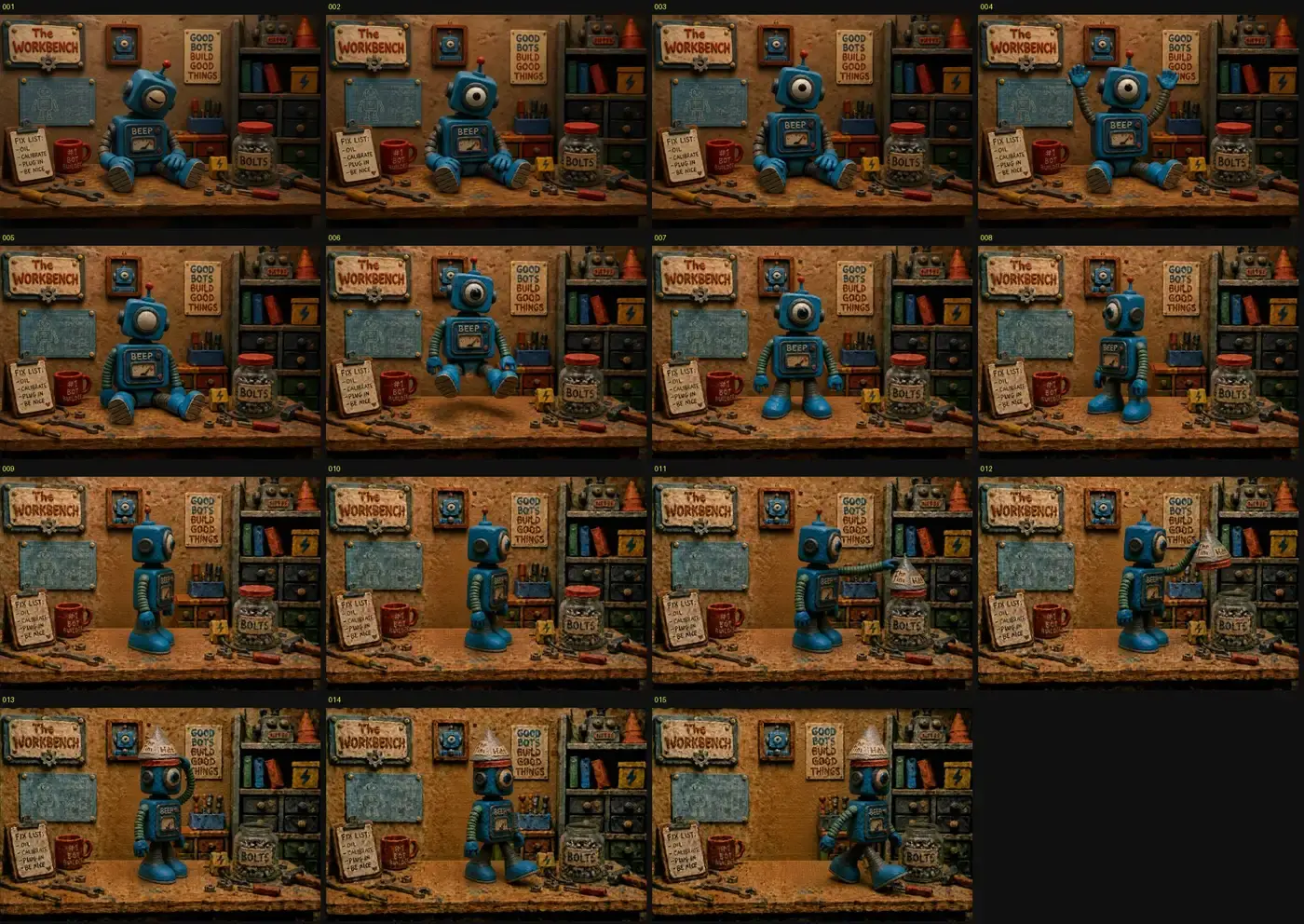
The workflow
- Write the anchor prompt as a set description: wide, locked-off, every prop named, the character in a neutral starting pose.
- Look at the anchor hard before continuing — everything in it is permanent. If the lamp is in the wrong place, fix it now, not at frame 9.
- Plan the action as a list of single moves. If a step has the word "and" in it, split it.
- Generate each frame with the previous frame as the reference, using the continuing-shot template.
- Audit on a contact sheet. Re-generate any frame where the background moved.
- Assemble at 2 fps with hard cuts — no crossfades. Crossfades re-introduce the smoothness you just spent all this effort avoiding.
Once the frames pass the audit, assembly is one ffmpeg command — numbered stills in, each one held, no interpolation:
ffmpeg -framerate 2 -i frame_%03d.png -r 24 -c:v libx264 -pix_fmt yuv420p out.mp4
-framerate 2 holds each still for half a second; -r 24 duplicates those holds up to a standard 24 fps output so every player accepts the file. There's no minterpolate and no tblend, so nothing gets blended between poses — the stepped cadence survives the encode. Name the frames frame_001.png, frame_002.png, … and they assemble in order.
Move one thing. Hold the camera. Cut hard.
Fifteen frames by hand is a fun afternoon. A stop-motion sequence inside a full-length video is many more, each one a single-move prompt you'd write and audit yourself.
FAQ
Can AI really do stop motion animation?
Yes, with the right structure: one anchor frame, each next frame generated from the previous one with a single small pose change, played back at a low frame rate. What doesn't work is asking a video model for "stop motion style" — it interpolates smooth motion, the opposite of the stepped cadence that makes stop motion read as stop motion.
What's the best AI for stop motion animation?
An image model with strong reference-image conditioning, not a video model. The reference handling is what keeps the set and character locked from frame to frame. We run sequences like these through GPT Image 2 and Nano Banana 2 — both hold a chained reference well.
How many frames do you need?
A readable action beat takes 10–20 frames at 2 fps — 5 to 10 seconds of screen time. The 15-frame sequence above covers a wake-up, a stretch, a hop, and an exit. Plan one frame per single move, and structure longer pieces as multiple chains separated by cuts.
What styles of stop motion can AI make?
Any handcrafted look the image model can render and hold: claymation, paper cutout, felt puppet, LEGO-style brickfilm. The chaining technique is identical for all of them — the style lives in the anchor frame and the style definition, not in the frame-to-frame prompts. One caveat: not every craft style needs stepped motion. We made a full paper cutout short with smooth video-model motion, because cutout animation reads as authentic either way — stop motion doesn't.
What frame rate should AI stop motion play at?
Start at 2 frames per second. With generated stills, long holds read as deliberate and storybook-like, and they keep the generation count manageable. Add in-between poses only where an action feels too jumpy.