How to create long-form video with Claude Code
How to create long-form video with Claude Code from scratch — the agent, the renderer, the image, motion, and voice services — and where it gets hard.
By Hayden · Cofounder, Framesail
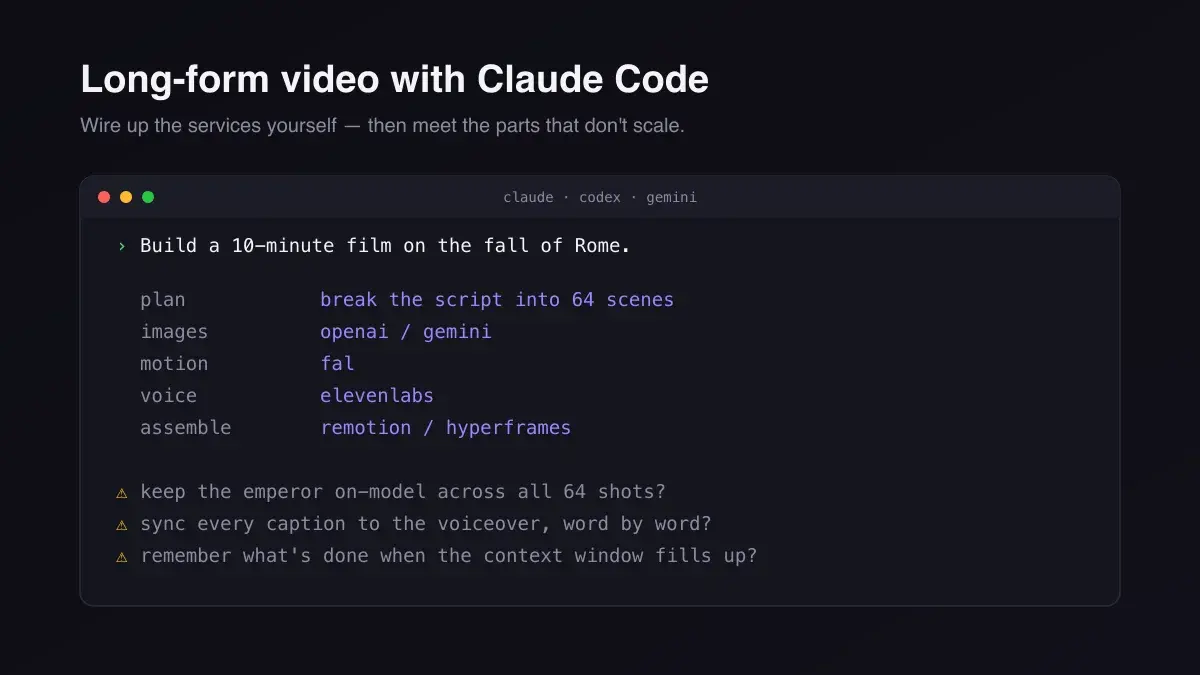
You can already get Claude Code to write a script and call an image model. Turning that into a 10-minute narrated YouTube video — the same character from the first shot to the last, captions that land on the right word, one video at the end — is a different problem. The script is the easy part. Everything downstream is wiring and bookkeeping. This is how to create long-form video with Claude Code from scratch: which services you connect, how the agent drives them, and the three things that quietly break once the video gets long.
The same build works with Codex or the Gemini CLI — anything that speaks MCP and can call tools in a loop. Claude Code is just the one we'll use for the examples.
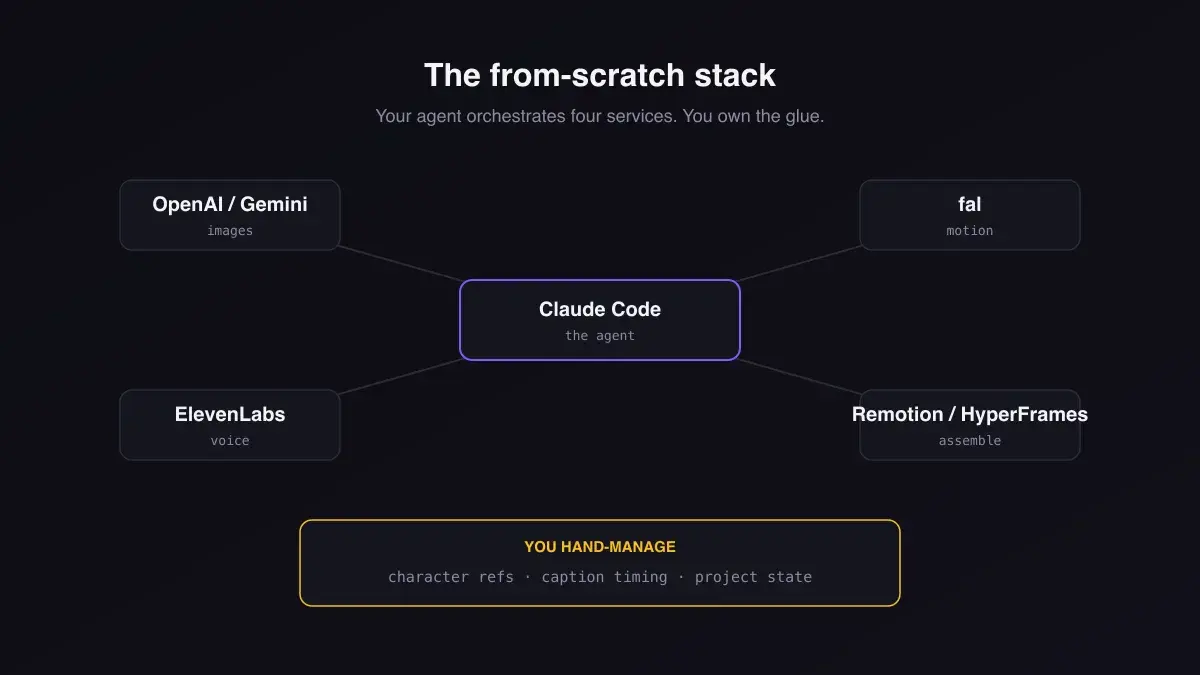
The from-scratch stack
A finished video is more than generated clips, so you assemble a few pieces. At minimum:
- A renderer to assemble the final cut. Remotion lets you build videos in React; HyperFrames is a code-driven renderer in the same spirit. Both are excellent for short, templated, data-driven pieces — a YouTube intro, a stat card, a 30-second promo.
- An image service for the stills behind each scene — OpenAI's image model or Gemini's.
- A motion service to animate those stills into shots — fal fronts the current video models (Veo, Kling, and friends) behind one API. (The three kinds of text to video API covers what each one hands back.)
- A voice service for narration — ElevenLabs for the voiceover and the word-level timings.
Claude Code is the conductor. It plans the script, decides what each scene needs, and calls each service in turn through their APIs or MCP servers — the Model Context Protocol is what lets one agent talk to all of them with a consistent tool surface. (Our rundown of the MCP servers worth connecting covers the wider ecosystem.)
Wiring it up with Claude Code
For a short clip, the loop is clean and you can have it working in an afternoon:
- Generate the script, then break it into scenes.
- For each scene, generate a still with the image service.
- Animate the still into a shot with fal.
- Generate the narration and timings with ElevenLabs.
- Drop the shots, audio, and captions onto a Remotion timeline and render.
For a 30-second video this is fun: the agent fans out across services, you stitch the results, and a renderer hands you a video. If that's the length you're making, you may not need anything else — Remotion or HyperFrames plus a few API calls is the right tool.
Where it breaks as the clips pile up
Stretch that same loop to a 10-minute YouTube video — dozens of scenes — and three things stop being afterthoughts. No model renders ten continuous minutes anyway: a single generation tops out at a few seconds — Google's Veo 3.1 caps at 8 seconds, OpenAI's Sora 2 at 16 or 20 seconds per generation — so a long video is always dozens of short clips stitched together. The failure isn't a cliff at some runtime; it's drift that accumulates gradually as you chain more clips without shared references.
Consistency. The image model has no memory between calls. The emperor's face shifts, his armor changes color, the throne room is a different room. You fix it by managing reference images yourself: generate one clean reference per recurring character and environment, then pass the right ones into each shot's prompt and label them inline — image_1 is the emperor, image_2 is the throne room — so the model knows which image is which. When a shot needs a fresh camera angle, a single headshot fights you; a multi-view sheet (front, three-quarter, profile, back) lets the model read the subject in 3D and render the new angle instead of parroting the reference's framing. When a shot continues straight from the last one, feed the frame you just rendered back in as the reference so identity carries forward. That bookkeeping is the job now, and it scales with the video.
Timing. Captions have to sit on the exact word being spoken. ElevenLabs will give you word-level timings, but you're the one mapping every timing onto every caption onto every scene's frame range in the renderer. One off-by-one and the subtitles drift for the rest of the video.
State. A project this long doesn't fit in a context window. Which scenes are rendered? Which failed? Which references go where? Once the agent forgets, it re-runs work or skips it, and you're babysitting a spreadsheet of shot statuses instead of making a video.
None of this is hard in isolation. But the glue — refs, timings, scene state, retrying failed shots — becomes the whole project, and the creative work gets buried under plumbing.
Build it yourself, or skip the plumbing
If you're making short clips, the from-scratch stack is the right call: wire up a renderer and a couple of services and go. If you're making long-form YouTube videos, the glue is the work, and that's the part framesail takes off your hands. It's not the agent and it's not a model. It's the workflow for long-form AI video that your agent connects to with one MCP connection, instead of you wiring four services yourself.
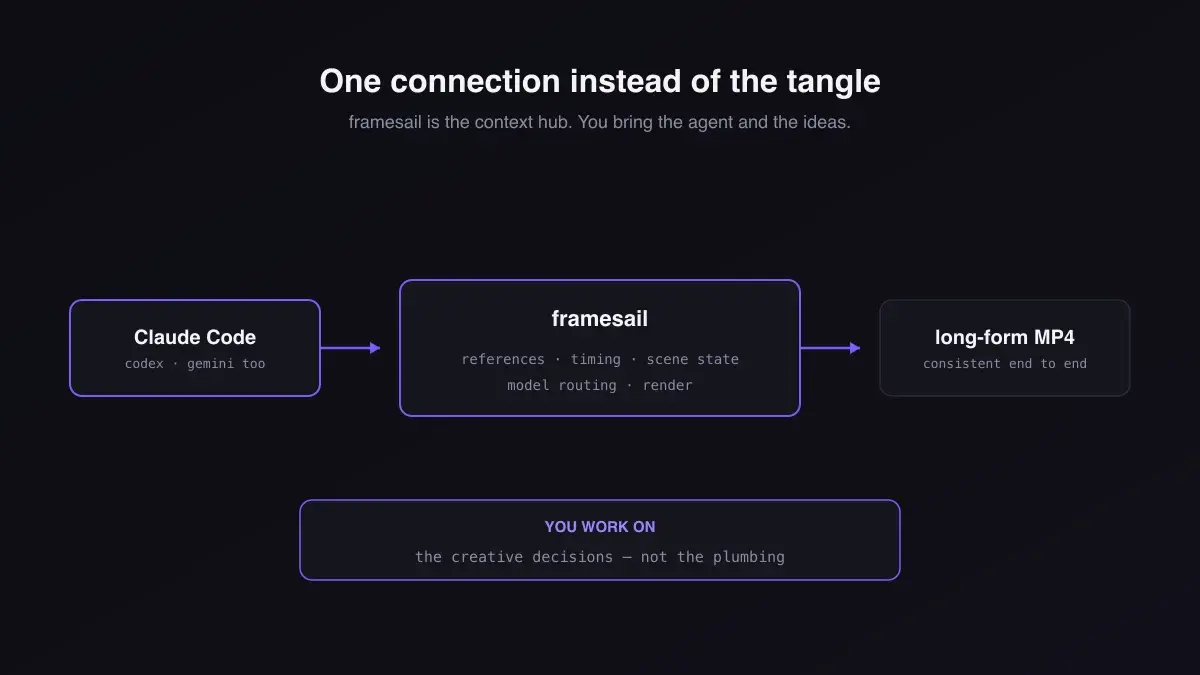
Your characters hold across the whole video, captions land on the word being spoken, and the project picks up where it left off in a fresh session, so the agent makes a video instead of babysitting exports. What's left is the work worth doing: the concept, the script, the style, and the calls on what each scene should feel like.
Connecting your agent is one command. On a Pro plan or above, create an API key on your account page, then:
claude mcp add --transport http framesail https://api.framesail.com/mcp \
  --header "Authorization: Bearer YOUR_FRAMESAIL_KEY"
The account page also hands you a ready-made version with your key already filled in — plus a paste-to-agent prompt for Cursor, Codex, or anything else that speaks MCP. From there, tell the agent what video you want; the workflow docs cover the rest.
FAQ
Do I have to use Claude Code specifically?
No. Any agent that can call tools in a loop works — Claude Code, Codex, or the Gemini CLI. They all speak MCP, so the connection and the workflow are the same; only the agent differs.
Can't Remotion or HyperFrames do the whole thing?
They render the final video, and they're great at it — especially for short, data-driven pieces. What they don't do is manage character consistency, voiceover timing, or project state across dozens of scenes. That orchestration is the part you'd otherwise build by hand.
What actually breaks first on a long video?
Consistency. By a handful of shots in, a character or environment has drifted, because the image model doesn't remember the previous shot. Reference-image management is the fix, and it's the first thing that turns a fun afternoon into bookkeeping.
Does framesail replace my agent?
No — you bring the agent. framesail handles references, timing, scene state, and model routing so the agent orchestrates a video instead of disconnected API calls.