Framesail — the best
Descript alternative.
We built Framesail for the channels that have nothing to record. An editing suite starts once footage exists — Framesail starts from a brief, generates every shot against your locked references, and carries a faceless long-form video from script to export.
What changes when you switch
The footage is generated, not filmed.
Framesail ends where an editor ends — a finished video on a timeline — but it starts before any recording exists. You lock your own cast and world once, everything downstream renders against them, and each stage is editable before the next runs.
- Step 01
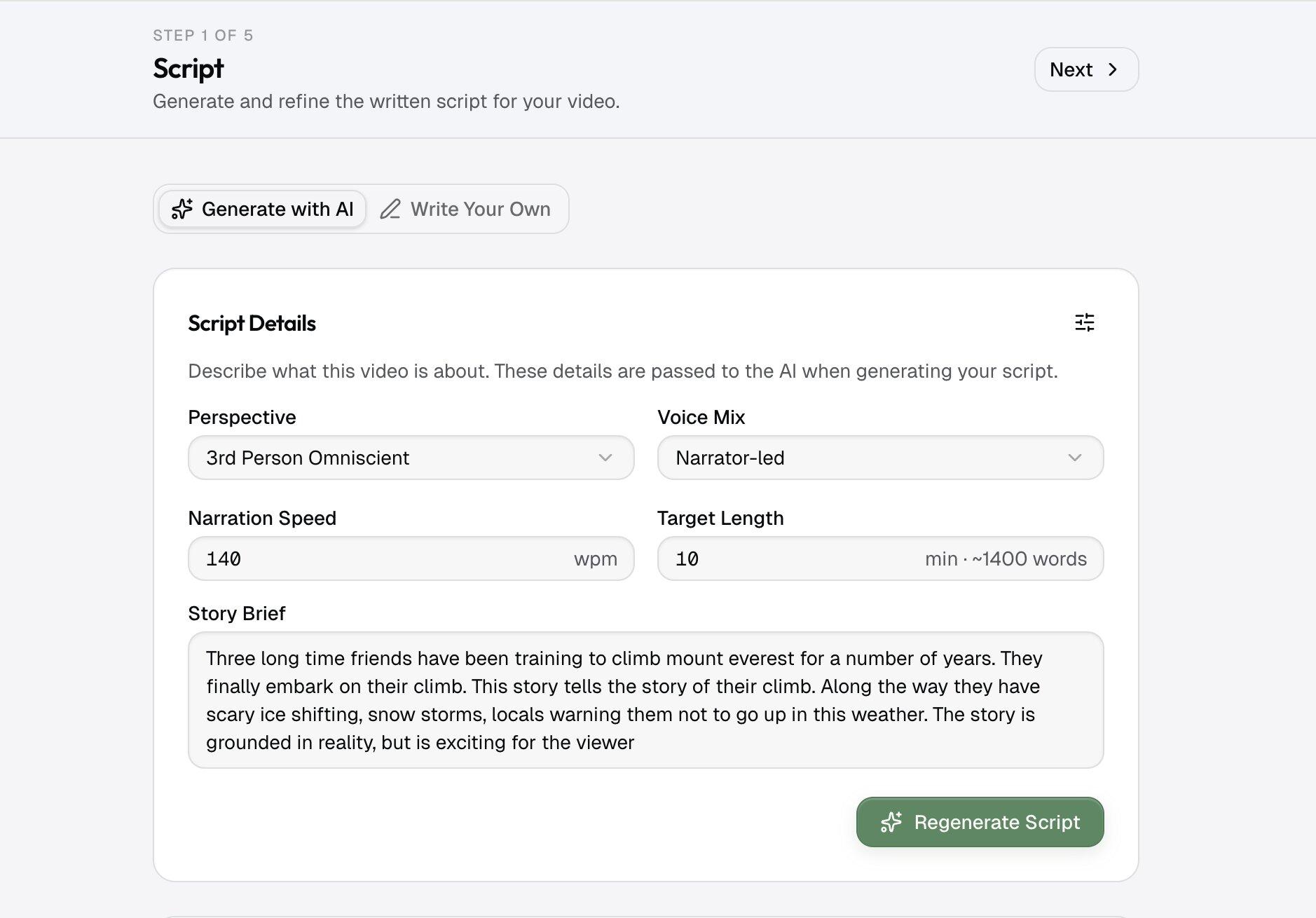
Brief becomes script
Hand it a topic line or paste a script you already have. The writing model drafts retention-paced narration, then marks every person and place it needs to keep on screen — and you can edit the prompt or swap the model before anything renders.
- Step 02
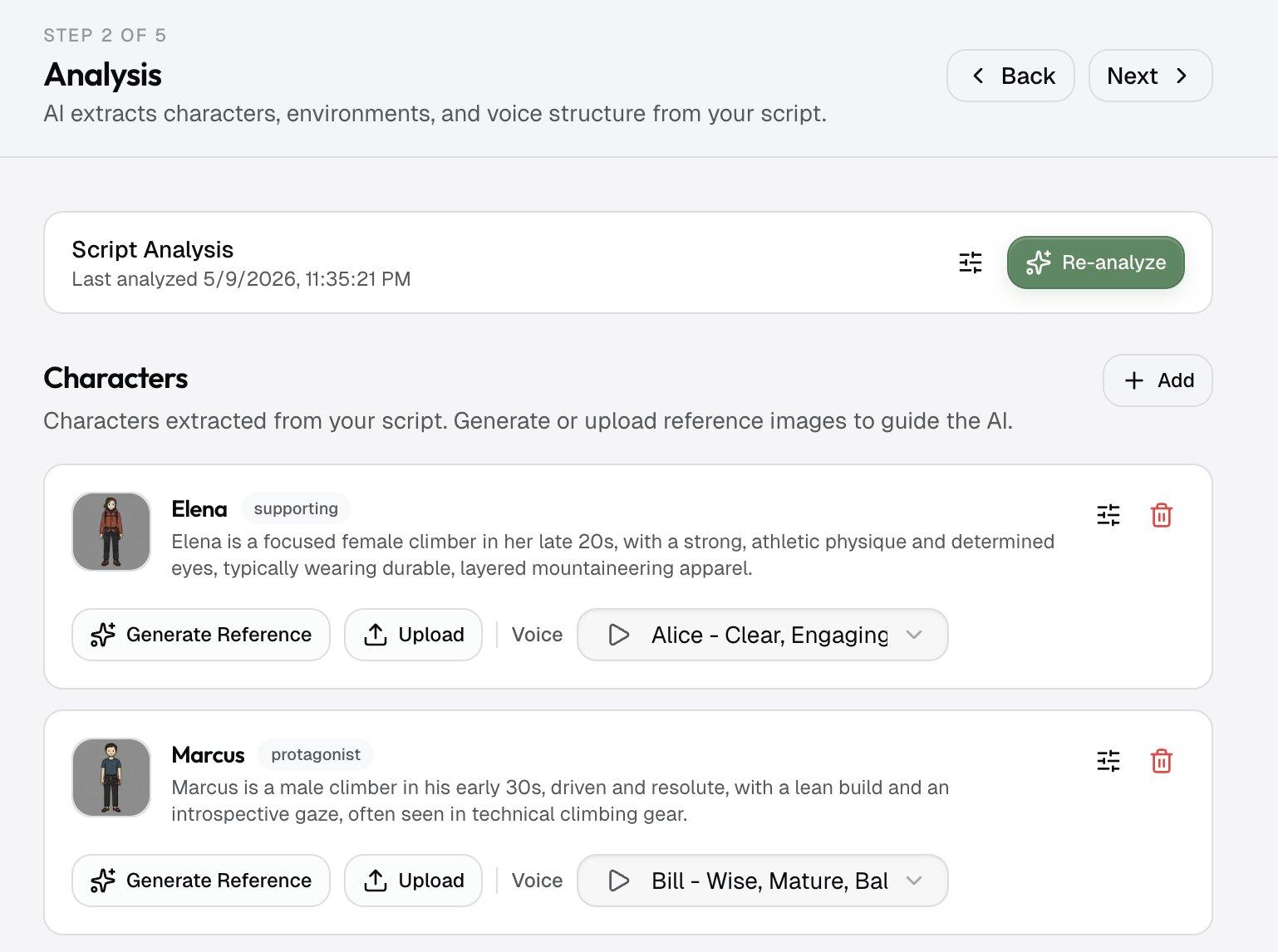
Cast and world get pinned
Before a single shot renders, each character and location becomes an approved reference frame. That frame — not a recording — is what every later image is held against, so the look stays put across an entire episode.
- Step 03
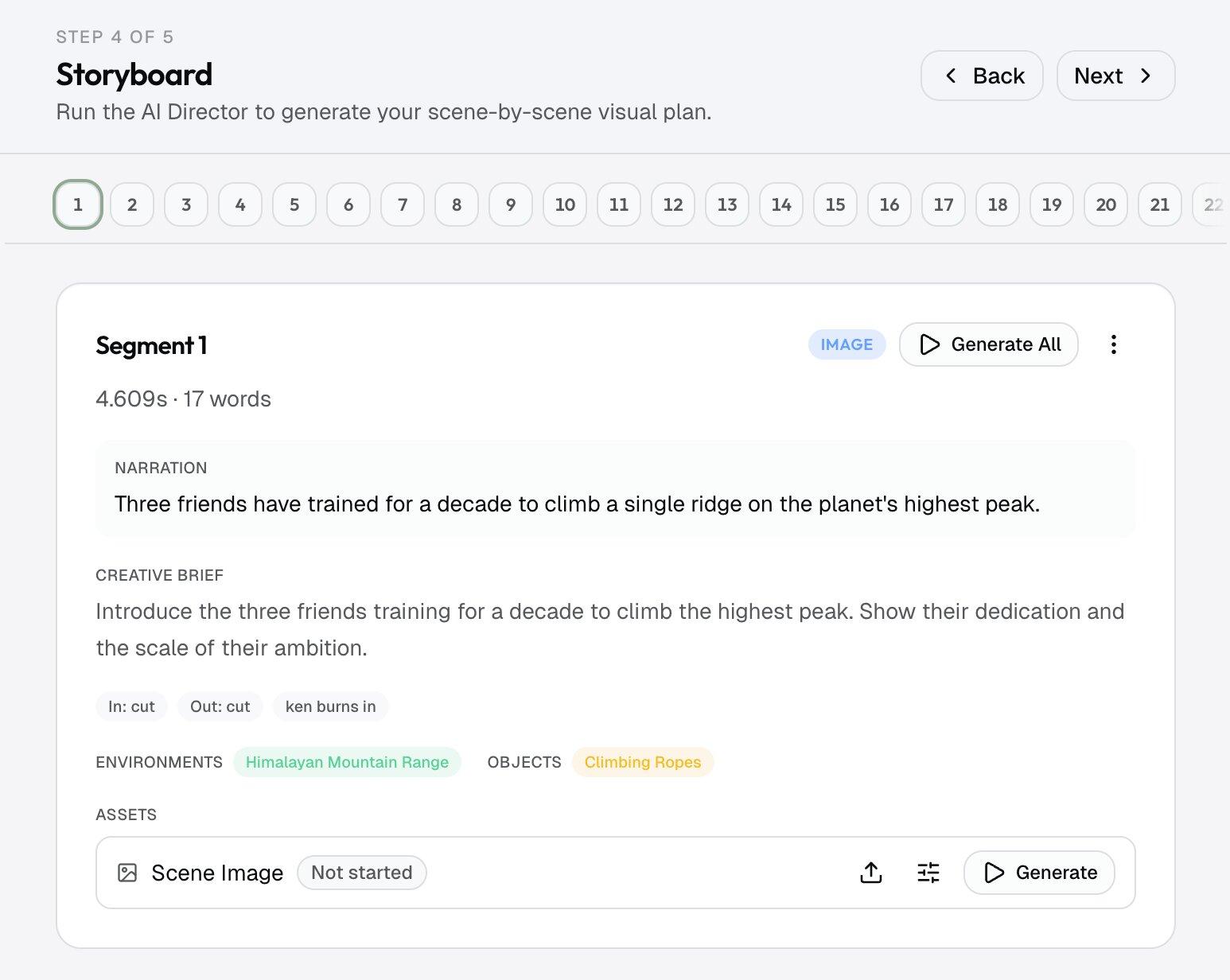
Shots build on the references
The narration is split into timed beats, and each beat gets a frame composed against the pinned cast and world. If one shot misses, you regenerate that shot — not the video.
- Step 04
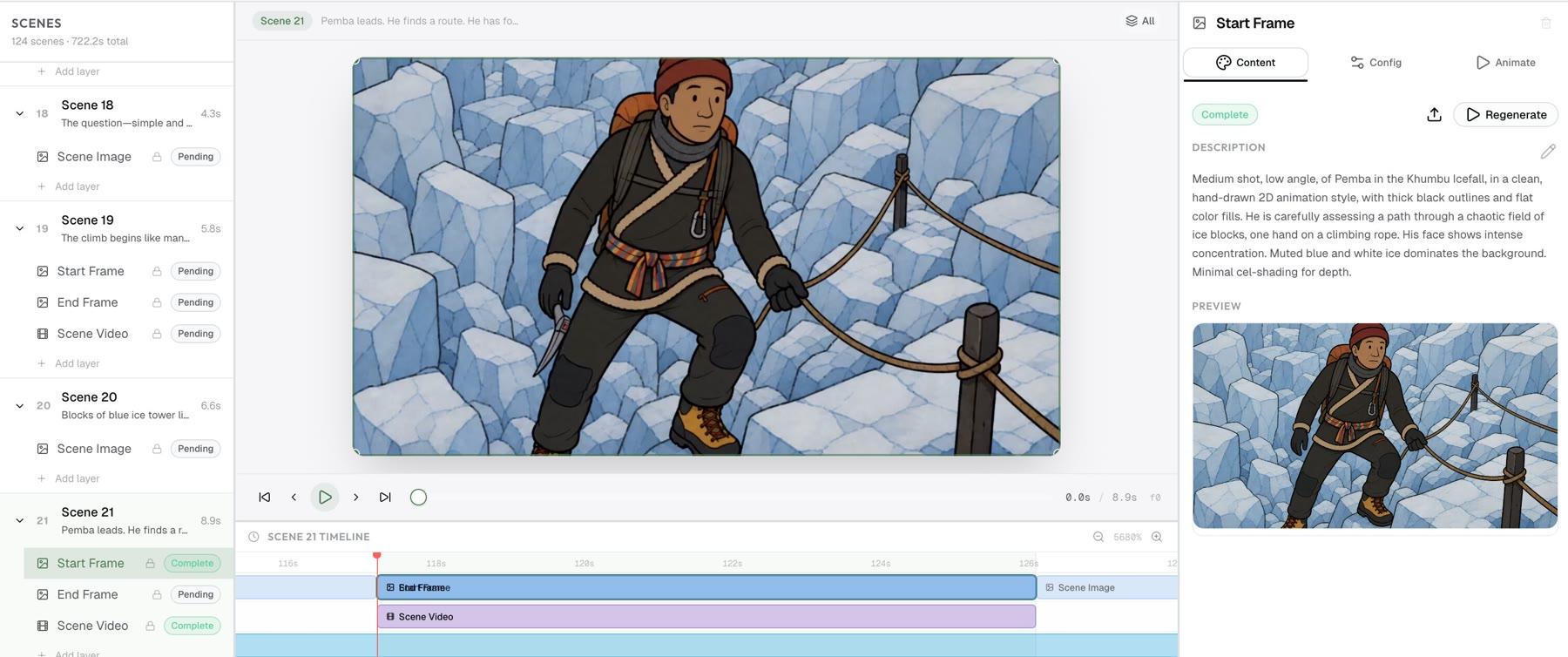
Cut, caption, export
Shots are set in motion, captions and music drop onto the timeline, and the whole thing renders to a clean, watermark-free MP4 you own — full commercial license on every paid tier.
Descript vs. Framesail
An honest side-by-side.
Descript is a suite for editing media you've recorded. Framesail is a pipeline for generating video you never filmed. Pick by what your channel is actually made of.
| Dimension | Descript | Framesail |
|---|---|---|
| Best at | Editing media you've recorded — podcasts, screen recordings, on-camera video | Generating cinematic long-form video you direct shot by shot |
| Starting point | A recording from your camera, mic, or screen | A topic line or script — no footage required |
| Visual engine | Your recorded footage, with AI inserts layered on top | Every shot generated against your locked references and style |
| Faceless channels | Assumes there's a recording to edit | Built for narration-led channels — generated scenes carry the video |
| Characters & world | No reference-locked cast for generated scenes | Characters and environments pinned to approved references across the video |
| Your look | Whatever the camera captured | Reusable style DNA reverse-engineered from your references |
| Model control | The suite drives its built-in AI features for you | You pick the model per job — script, image, video, voice |
| Own-keys option | Usage metered through subscription plans | BYOK plan: bring your own provider keys, no token markup |
What you get switching to Framesail
Your look, your cast, your shots.
Footage without a shoot
An editor needs something to edit — a mic, a camera, a screen capture. Framesail's pipeline starts before any of that exists: a topic line becomes a script, the script becomes locked references, and the references become every shot in the video. The channel never waits on a recording.
Characters that survive the whole video
When the footage is generated instead of filmed, nothing keeps a face the same between shots unless the pipeline enforces it. Framesail locks an approved reference image for every character and environment and renders each shot against it — the face in minute nine is the face from minute one.
A channel look you own
Framesail reverse-engineers your art direction, narration voice, and pacing into reusable style DNA — from your published videos or reference images — and holds every generated shot to it. New episodes inherit the look instead of rebuilding it.
Regeneration scoped to the miss
When a generated shot misses, you regenerate at the level that failed: one image, one voice line, one shot — never the whole video. The per-action credit cost is shown before you click, and a BYOK plan lets high-volume creators pay providers directly with no token markup.
Why creators look for a Descript alternative
An editor needs footage. Some channels have none.
Descript is a text-based editing suite for recorded media — podcasts, screen recordings, on-camera video — with AI assistance layered on top. Its workflow starts once a recording exists. A faceless long-form channel starts earlier than that: there is no recording, and the visuals — every character, every environment, every shot — have to be generated and kept consistent for the length of the video.
Framesail spends its entire pipeline on exactly that gap. Your look becomes reusable style DNA, your cast and world pin to approved references so characters hold across a long-form video, and every stage is editable before the next one runs. It's built for faceless channels where the video is the product — and where nothing was ever filmed.
Descript creator questions
Descript alternative, answered straight.
Why do creators look for a Descript alternative?
Usually because of what their channel is made of. Descript is built for recorded media — podcasts, screen recordings, on-camera video — and its workflow starts once a recording exists. Faceless long-form channels have nothing to record: the visuals have to be generated, kept consistent across scenes, and held to a channel look. That's a generation pipeline, not an editing suite, and it's the job Framesail is built for end to end.
Is Descript good for faceless YouTube?
It depends on what the episodes are made of. If a channel runs on screen recordings or a voice track over slides, an editing suite fits the material. But faceless narrative channels — history, mystery, explainers with a cast and a world — need every shot generated, characters that hold across scenes, and a look the channel owns. Framesail generates that footage against locked references instead of editing footage that was never filmed.
Descript vs Framesail — what's the real difference?
What the tool operates on. Descript operates on recordings: you bring media in, and its tools edit it. Framesail operates on a brief: your style is reverse-engineered into reusable style DNA, your characters and environments are pinned to reference images, and the pipeline generates the script, the shots, the voiceover, and the cut — with every prompt, model, and setting editable at each stage before the next one runs. One edits what exists; the other creates what doesn't.
Is there a free Descript alternative?
Not one worth running a real channel on. Quality long-form AI video runs on frontier image and video models that cost real money per render, so every serious tool is paid. Framesail is paid too, with one difference in kind: a BYOK (bring-your-own-keys) plan where you pay the model providers directly and Framesail adds no token markup — usually the cheapest way to run at volume.
Can I move my channel over from Descript?
Yes, and it's about your style, not your files. Paste existing scripts straight in, and point Framesail's style analysis at your published videos or reference images — it reverse-engineers your art direction, narration voice, and pacing into a reusable style. Recreate recurring characters as locked references once, and every future episode renders against them. There's no project-file import between the two tools, but rebuilding a channel's look is a one-time setup.
Can I use the videos commercially?
Yes. Every paid Framesail tier includes a full commercial license covering monetized channels, ads, sponsorships, and client work, with clean watermark-free MP4 export. The license is the same across Creator, Pro, and BYOK — not an upsell.
More on the main FAQ page.
Judge it on your own video, not a sales page.
Run one real brief through the full pipeline and watch a video come out the other end with nothing recorded — reference-locked, clean export, commercial license included.
Framesail is an independent product and is not affiliated with, endorsed by, or sponsored by Descript. Descript is a trademark of its respective owner; comparisons reflect publicly available information as of mid-2026.