YouTube Automation Tools: The Stack That Works in 2026
The youtube automation tools that matter in 2026, organized by job: script, image, video, voice, and assembly, plus when one pipeline beats ten open tabs.
By Hayden · Cofounder, Framesail
Search for youtube automation tools and you'll get a listicle of ten subscriptions, each with an affiliate link and a discount code. The honest answer is shorter. A faceless channel needs five jobs covered: a script, images, video clips, a voiceover, and something that assembles them into a finished video. Every tool on every list maps to one of those five jobs, or it's channel admin you don't need yet.
So the real question isn't "which tools." It's whether you cover the five jobs with separate tools you stitch together, or with one pipeline that hands each job to the next. Below: the jobs, the models worth using for each in 2026, and where each approach breaks.
What youtube automation tools actually have to do
Strip the category to its jobs and it's this:
- Script. The video's spine. Any frontier chat model drafts one; the angle and the fact-checking are still yours.
- Images. Frames, reference art, and stills that match the script line by line.
- Video. Animated shots generated from those frames, or sourced b-roll.
- Voice. The narration. This is where cheap channels give themselves away first.
- Assembly. Timing, captions, motion graphics, and the final cut into one video.
Notice what's not on the list: niche research dashboards, thumbnail generators, title optimizers. Useful eventually, but they're channel admin. A channel with a great spreadsheet and a weak video loses to the inverse every time. We covered the full production model in the YouTube automation guide; this post is just the tooling layer.
The best tools for each job in 2026
By job, not by brand. The frontier moves fast; as of mid-2026 this is where it sits.
- Script: any frontier chat model produces a competent draft. None produces an angle. Feed it your research and your take, or the script reads like everyone else's.
- Images: Nano Banana Pro and GPT Image 2 are the two serious options. Nano Banana Pro follows art direction and reference images more faithfully; GPT Image 2 tends to polish everything toward the same glossy look.
- Video: Veo 3.1, Kling v3, and Seedance 2 Pro lead. They differ in motion quality and how well they hold a subject; for faceless long-form, the deciding factor is whether the clip respects the frame you gave it.
- Voice: ElevenLabs v3 and MiniMax Speech 2.8 HD. Directed with pacing and emphasis, both hold attention far closer to a human read than default text-to-speech settings do.
- Assembly: Remotion for programmatic motion graphics and captions, or a traditional editor if you're cutting by hand.
That's the stack. Five subscriptions, five browser tabs, and a folder of exports moving between them.
All-in-one youtube automation software vs a stack of tools
The stitching is the hidden cost. Every hand-off between tabs is an export, a re-upload, and a chance for the pieces to stop matching: the voiceover runs long, the clips were generated before the script changed, the character in shot 12 no longer matches shot 3.
All-in-one youtube automation software exists to remove the stitching, but most of it removes your control along with it. Tools like TubeGen surround a fixed engine with add-on channel admin (niche research, thumbnails, titles); we broke down the trade in the TubeGen comparison. Template-first editors like InVideo assemble stock and slides fast, which is a different product than generating original long-form; that comparison is here. The pattern across the category: one-click convenience, opaque engine, and output that looks like the tool that made it.
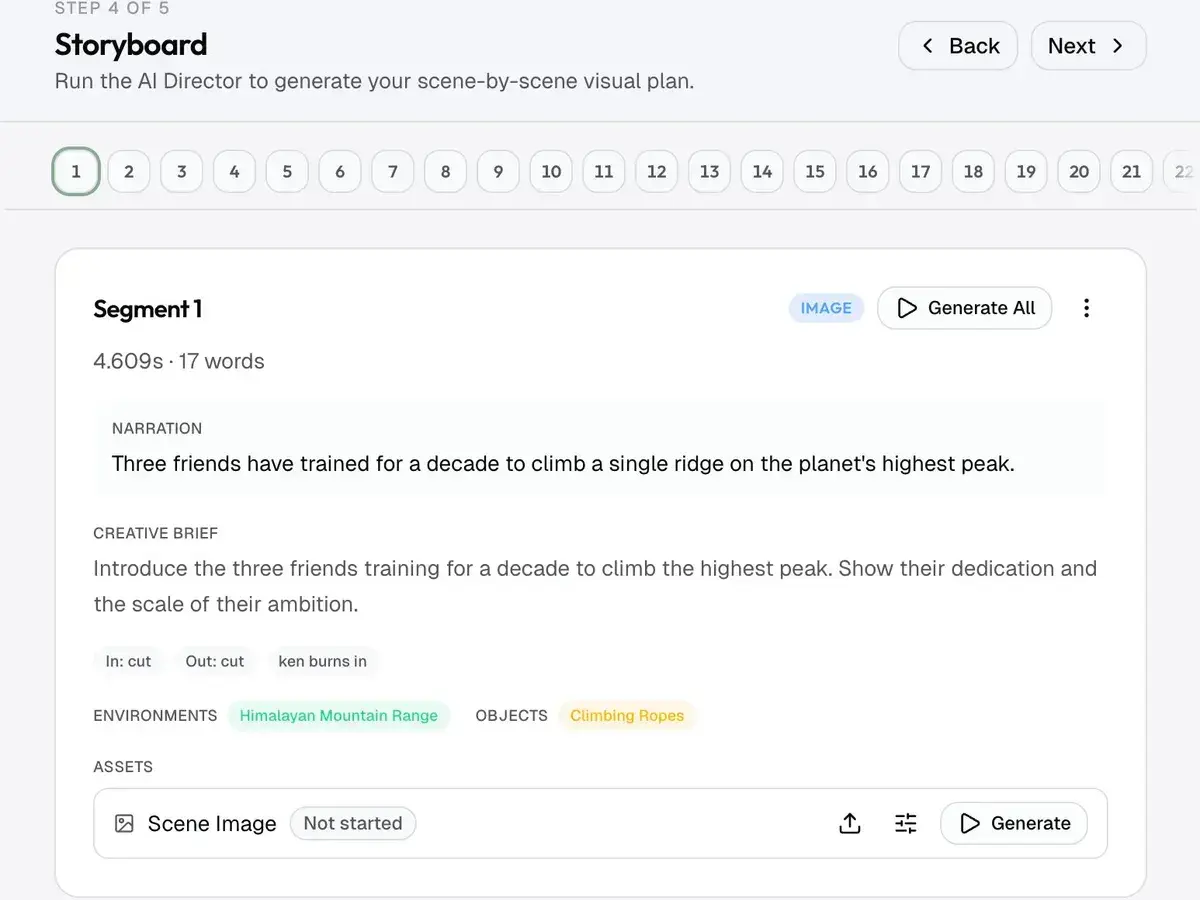
The third option is a pipeline — a script to video AI running the same frontier models as the stack, with the hand-offs automated instead of exported. Script feeds storyboard, storyboard feeds frames, frames feed motion, voiceover times the cut. You keep the model choice and the shot-level control; the stitching stops being your job.
Where tool stacks break
Wherever you land, the failure points are the same, and none of them are generation quality.
- Hand-off drift. The script changes after the visuals were made, and nothing forces them back into sync. This is the tax every multi-tab stack pays per video.
- Character drift. Any recurring character changes face between shots unless a locked reference travels through the whole chain. The fix is reference images carried into every shot, which is exactly what a folder of exports can't do.
- Uniform pacing. Tools that render every clip at the same length produce the monotony retention graphs read as "nothing's happening."
- The policy line. YouTube demonetizes mass-produced, repetitive uploads regardless of which tools made them; its channel monetization policies draw the line at content that adds nothing to its sources. No tool purchase moves you to the right side of that line. The script does.
FAQ
Is there an AI that fully automates a YouTube channel?
No. Tools automate production: drafting, image generation, voiceover, assembly. Judgment doesn't automate: the niche, the angle, the hook, and the decision that a video is good enough to publish still need a person. Anything promising a channel that "runs itself" is selling the dream, not the workflow.
What tools do faceless YouTube channels use?
The serious ones run a stack covering five jobs: a frontier chat model for script drafts, Nano Banana Pro or GPT Image 2 for images, Veo 3.1, Kling v3, or Seedance 2 Pro for video, ElevenLabs v3 or MiniMax Speech 2.8 HD for voice, and Remotion or an editor for assembly. The tool names matter less than covering the jobs and keeping the outputs in sync.
Are there free youtube automation tools?
Free tiers exist for most of the jobs, but quality long-form runs on frontier models that cost real money per render, so free tools cluster at the template end. A channel meant to earn revenue is a business with production costs: the automation guide covers the realistic budget, and how much YouTube pays per view covers what comes back.
Does YouTube allow automation tools?
Yes. YouTube's rules judge the output, not the toolchain: original scripts, original visuals, and a real point of view are fine however they were produced. What gets demonetized is "inauthentic" mass-produced or reused content, and automation tools make that easier to produce at scale, which is why automated channels get flagged more often.
Should I buy an all-in-one tool or build a stack?
Build a stack if you want maximum control and don't mind being the integration layer. Buy all-in-one software if you'll trade control for speed. The third option is a pipeline on named frontier models: one system, but you still pick the model and direct each shot. Match the choice to the part of the work you actually want to own.
How framesail handles it
framesail is the pipeline option: the five jobs run as six stations (script, storyboard, image set, animated frames, voiceover, motion graphics) on the same frontier stack you'd assemble by hand: Veo 3.1, Kling v3, or Seedance 2 Pro for video, Nano Banana Pro or GPT Image 2 for images, ElevenLabs v3 or MiniMax Speech 2.8 HD for voice, and Remotion for motion graphics. You pick the model per job; the hand-offs, the reference-carrying, and the sync between script and visuals are the part that's automated. It doesn't make the channel hands-off, and it won't pick your niche. It removes the ten tabs.
To try it, start a project.
The tools were never the moat. Covering five jobs without losing sync between them is.