Which AI Video Generator Should You Use? The Three Layers
Which AI video generator should you use? It depends on the layer — raw models, aggregators, or end-to-end pipelines. Here's how to pick the right one.
By Jordan · Cofounder, Framesail
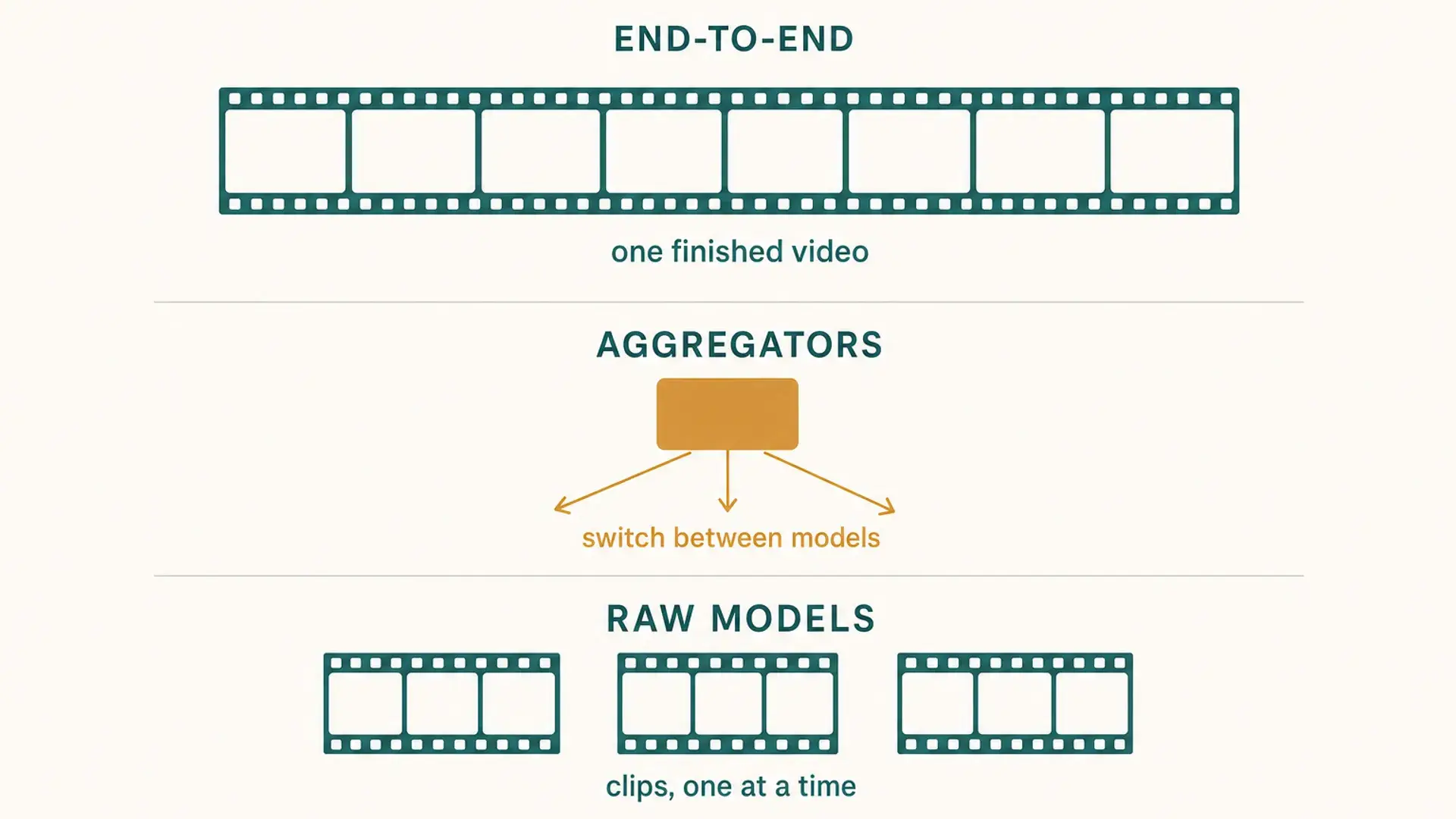
Which AI video generator you should use depends entirely on what layer you're talking about, because "AI video generator" now means three different things: the raw models, the aggregators sitting on top of them, and the end-to-end tools that run a whole pipeline. Most people asking the question want the third one and don't know it yet, because the model launches get all the attention.
The layers aren't competing products. They're different altitudes on the same stack, and picking the wrong one is why people bounce between tools for months.
Layer 1: the raw models
Veo 3.1 (Google) and Seedance 2 Pro (ByteDance) are the two I reach for when I want pure clip quality — Veo for realism and physics, Seedance for motion and multi-shot consistency. Kling v3 Pro and Hailuo 2.3 Pro are both worth a look and can be very good for animated visuals. The ranking changes often enough that I'd treat any "best model" list, including this one, as a snapshot rather than a verdict.
What you get out is a five-to-ten second clip, one at a time.
That constraint is the whole story of this layer. Want something longer? You stitch clips together yourself, and you spend most of your time fighting to keep the visuals consistent between them — the jacket loses a button, the room's key light shifts, the camera height moves half a foot. Character drift across shots is the single most time-consuming part of working here, and it gets worse with every clip you add.
Use this layer when the clip is the deliverable: a hero shot for an ad, a single scene, a look test.
Layer 2: the aggregators
fal and Higgsfield sit on top of the models and let you switch between them from one place.
fal is a developer playground — API-first, pay per generation, good when you're benchmarking models against each other or building something on top of them. Higgsfield is more creator-oriented, with presets and effects layered over the same underlying models.
They solve a real problem: model access and queue capacity. If you've outgrown one provider's queue, or you want to run the same prompt through Veo and Seedance without maintaining three accounts, this is the layer that helps.
What they don't solve is anything downstream of generation. You still get clips out, not videos. The stitching, the voiceover, the pacing, the captions — all still yours.
Layer 3: the end-to-end tools
This is the layer I work at, so weigh the rest accordingly — full disclosure, I built one of them (framesail).
End-to-end tools take a script or a concept and run the whole pipeline: script, voiceover, storyboard, the actual image and video generation (often calling the same models from layer one under the hood), then editing and export. You hand it an idea; you get back a finished video.
The trade is real and worth stating plainly. You give up shot-level control in exchange for actually finishing things. If you need frame-perfect authority over one hero shot, layer one is better and it isn't close. If you need forty shots that hold together and go out on a schedule, hand-stitching clips stops being viable somewhere around the third video — not because it can't be done, but because the consistency bookkeeping grows faster than the footage does.
That's the honest dividing line: clips are a generation problem, videos are a continuity problem. Layers one and two are very good at the first. Only layer three is built for the second.
Picking your layer
Work backwards from the deliverable, not from the model you read about last week:
- A single clip, maximum control → a raw model. Veo 3.1 or Seedance 2 Pro, direct.
- Comparing models, or building on top of them → an aggregator. fal if you're writing code, Higgsfield if you're not.
- A finished video on a repeating schedule → an end-to-end pipeline. This is the long-form video generator case.
- Not sure yet → start at layer one for a week. You'll find the ceiling fast, and you'll know exactly which problem you're actually trying to solve.
The mistake I see most often is someone picking a layer-one model because a demo looked incredible, then spending two months building a fragile manual pipeline around it — effectively rebuilding layer three by hand, badly, one video at a time.
How framesail fits
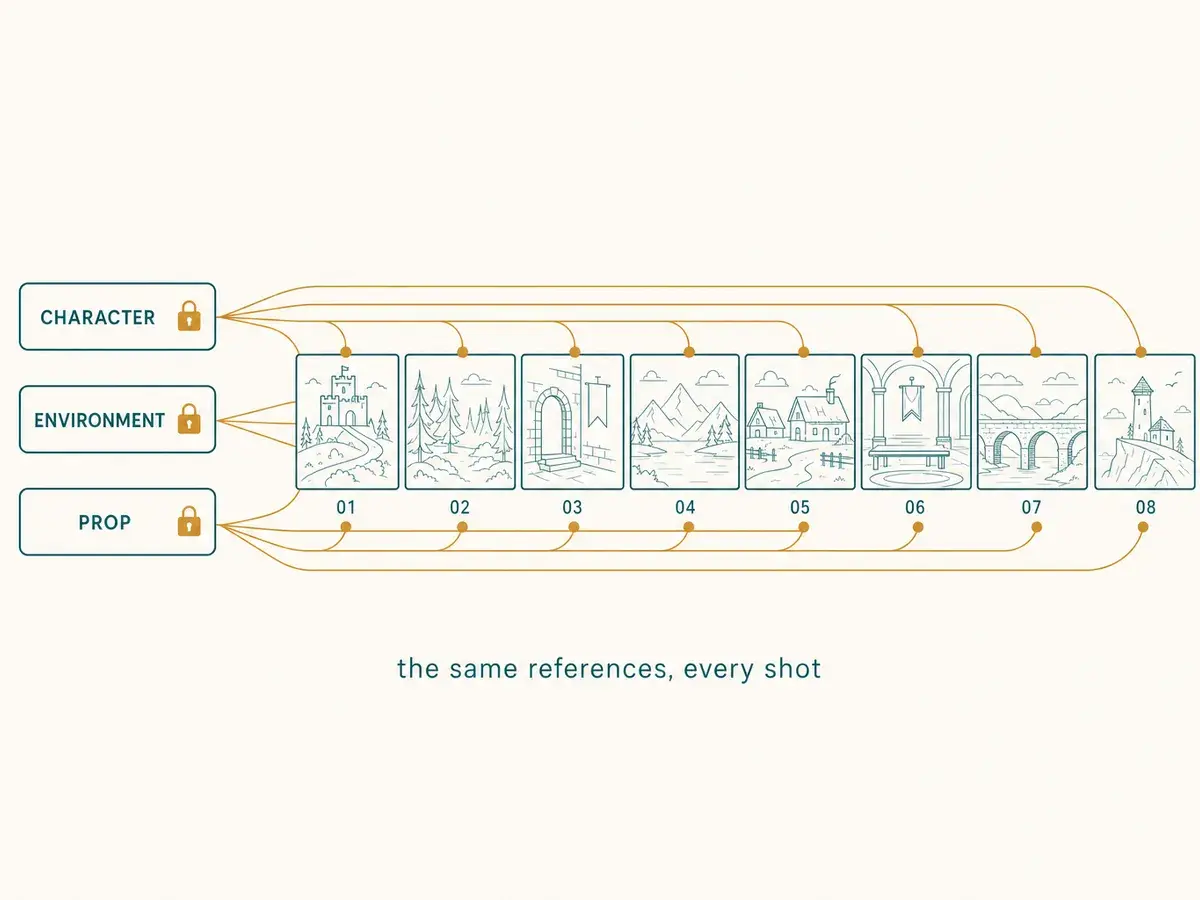
framesail sits at layer three, built specifically for long-form. Characters, environments, and props are created once and locked as references; every shot renders against them, so continuity is handled by the architecture instead of by you remembering which reference goes where. Underneath it runs the frontier models named above — you pick which one per job rather than being married to a single provider.
It won't give you frame-level authority over a single hero shot. That was never the trade it's making.
To try it, start a project.
FAQ
What is the difference between an AI video model and an AI video generator?
A model — Veo 3.1, Seedance 2 Pro, Kling v3 Pro — is the thing that turns a prompt into footage, usually five to ten seconds at a time. "AI video generator" is a loose term people apply to models, aggregators, and full pipelines interchangeably, which is exactly why the question is confusing. Ask what comes out the other end: a clip, or a video.
Can I make a long video with just Veo or Seedance?
You can, but you're doing the assembly. The models produce short clips, so a ten-minute video means generating dozens of them and manually holding characters, environments, lighting, and pacing consistent across every cut. It's viable for one video and painful by the third.
Are aggregators like fal worth it if I'm not a developer?
fal specifically is API-first and aimed at people writing code, so probably not. Higgsfield is the more approachable option at that layer. But if your goal is a finished video rather than model experimentation, an aggregator solves the wrong half of the problem for you.
Which AI video generator should I use for a faceless YouTube channel?
An end-to-end pipeline, almost always. Channel work is defined by cadence and continuity — the same characters and look across many videos — which is precisely what the clip-level layers leave to you. The faceless video generator case is the clearest example of layer three earning its trade.
Do end-to-end tools use the same models underneath?
Usually, yes. Most call the same frontier models available at layer one. The difference isn't the generation quality of any single shot — it's everything wrapped around it: reference management, storyboarding, voiceover timing, and export.
How often does the "best model" ranking change?
Often enough that it's not a good basis for choosing a tool. Model leadership has changed hands several times in the past year. Choosing a layer is a durable decision; choosing a model is a temporary one, which is another argument for tools that let you swap the model per job.